

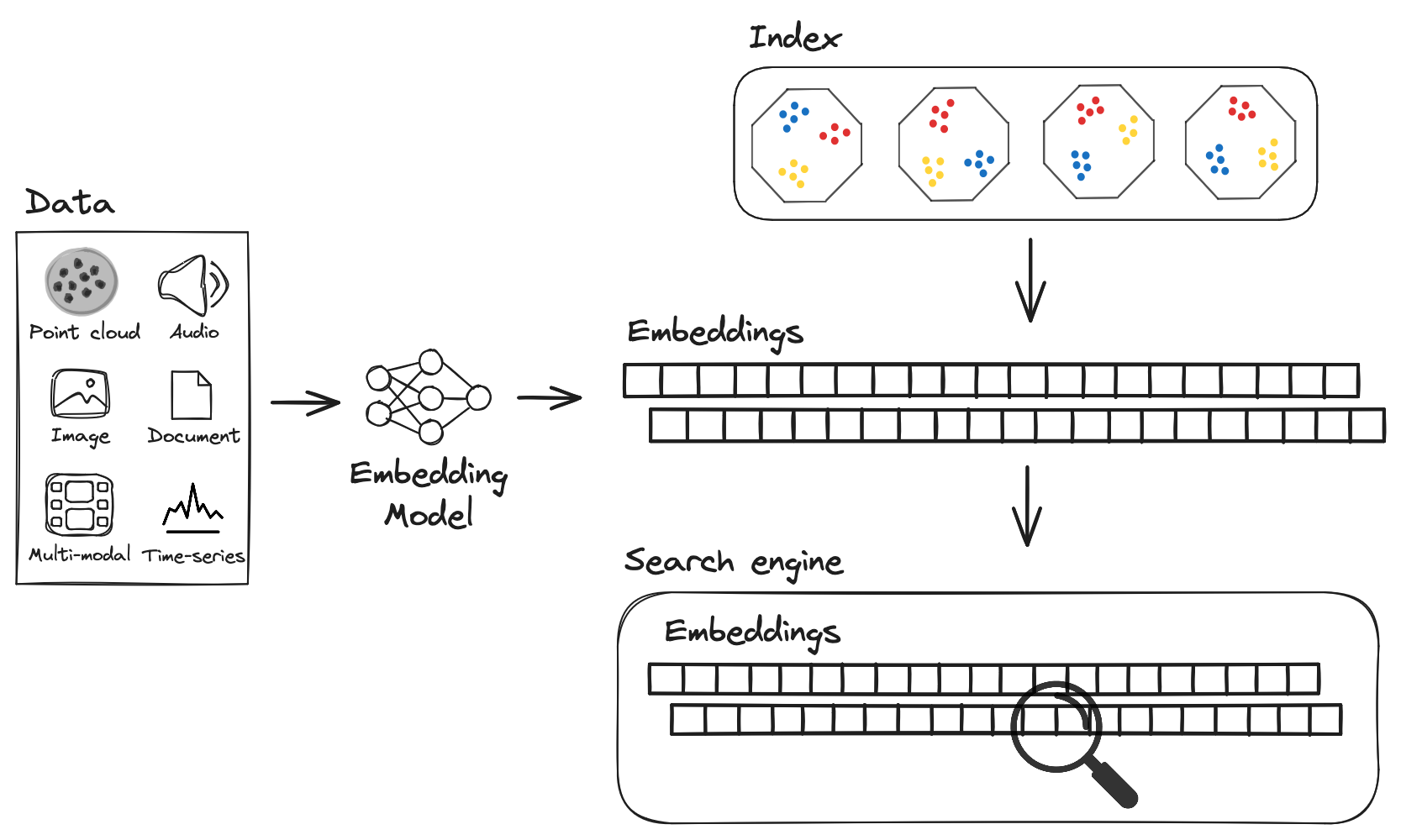
Supported distance metrics
Distance metrics determine how LanceDB compares vectors to find similar matches. Euclidean orl2 is the default, and used for general-purpose similarity, cosine for unnormalized embeddings, dot for normalized embeddings (best performance), or hamming for binary vectors.
The right metric improves both search accuracy and query performance. Currently, LanceDB supports the following metrics:
For indexed search, supported distance metrics vary by index type:
Configure Distance Metric
By default,l2 will be used as metric type. You can specify the metric type as
cosine or dot if required (hamming is supported for IVF_FLAT index only).
Note: You can configure the distance metric during search only if there’s no vector index. If a vector index exists, the distance metric will always be the one you specified when creating the index.
Here you can see the same search but using cosine similarity instead of l2 distance. The result focuses on vector direction rather than absolute distance, which works better for normalized embeddings.
Set .limit(...) on vector searches you run in applications. You can page through results with .offset(...) and include LanceDB’s internal row id with .with_row_id() / .withRowId() when you need a stable handle for follow-up operations.
Selecting the vector column
If your table has exactly one vector column, you can omit the column name and LanceDB will pick it for you. This works for both top-level columns (such asvector) and vector fields nested inside a struct (such as image.embedding).
When LanceDB can’t infer a single column, it raises a ValueError (Python) or rejects the query (Node/Rust). Two cases trigger this:
- No vector column: the schema has no
fixed_size_listorlistof floats. - Multiple candidates: more than one column matches the query’s dimension. The error lists every candidate path so you can pick one explicitly.
[A-Za-z0-9_] in backticks (for example, `image-meta`.`embedding.v1`).
The same field-path syntax works when creating an index on a nested vector column:
When several columns share a name across structs (for example, image.embedding and text.embedding), LanceDB still picks the one whose dimension matches your query vector. If two candidates have the same dimension, you must pass the column name explicitly.
Vector Search With ANN Index
Instead of performing an exhaustive search on the entire database for each and every query, approximate nearest neighbour (ANN) algorithms use an index to narrow down the search space, which significantly reduces query latency. The trade-off is that the results are not guaranteed to be the true nearest neighbors of the query, but are usually “good enough” for most use cases. Use ANN search for large-scale applications where speed matters more than perfect recall. LanceDB uses approximate nearest neighbor algorithms to deliver fast results without examining every vector in your dataset.Exact vs Approximate Distances
When doing vector search, the meaning of “distance” depends on whether you are using an index and whetherrefine_factor is specified as part of your query.
nprobes controls how many partitions are searched to find candidates, approx_mode controls the query-time speed/recall trade-off for RQ-quantized indexes, and refine_factor controls how many candidates are rescored on full vectors for better distance fidelity and reranking quality.
The table below summarizes the behavior of _distance in search results based on your query configuration:
For deeper tuning guidance on indexing and performance estimation, see the vector indexes page,
For tuning
nprobes, see below.
Tuning approx_mode
Use approx_mode when you want to adjust the speed/recall trade-off for approximate vector search at query time. This setting currently applies only to RQ-quantized indexes, such as IVF_RQ; other index types ignore it.
The supported values are:
You can change
approx_mode per query without rebuilding the index. For RQ indexes built with num_bits=1, normal uses the same one-bit scoring path as fast. If you also set refine_factor, LanceDB first uses approx_mode while finding candidates, then reranks the selected candidates on full vectors.
Tuning nprobes
nprobescontrols how many partitions are searched at query time.nprobesimproves candidate recall, but does not by itself make_distanceexact.- By default, LanceDB automatically tunes
nprobesto achieve the best performance without noticeably sacrificing accuracy. - In most cases, leave
nprobesunset and use the auto-tuned value. - Only tune
nprobesmanually when recall is below your target, or when you need even higher performance for your workload. - If recall is too low, increase
nprobesgradually, but after a certain threshold, increasingnprobesyields only marginal accuracy gains. - If you need higher performance and have recall headroom, decrease
nprobesgradually.
minimum_nprobes and maximum_nprobes. LanceDB starts
with the minimum and can scan more partitions up to the maximum if the filter leaves too few
candidates. Calling nprobes(n) fixes both values to n, which disables that adaptive behavior.
Vector Search with Prefiltering
This is the default vector search setting. You can use prefiltering to boost query performance by reducing the search space before vector calculations begin. The system first applies your filter criteria to the dataset, then conducts vector search operations only on the remaining relevant subset. This filters out rows where label ≤ 2 before doing vector search, then picks specific columns from the top 5 matches. The.where("label > 2") applies a filter before vector search, .select(["text", "keywords", "label"]) chooses specific columns to return, and .limit(5) restricts results to the top 5 most similar vectors.
As a result, you’ll see a result with just the data you want from the most similar vectors.
Vector Search with Postfiltering
Use postfiltering to prioritize vector similarity by searching the full dataset first, then applying metadata filters to the top results. This approach ensures you get the most similar vectors before filtering, which can be crucial when similarity is more important than metadata constraints. Here you can see how to do vector search first to get the most similar vectors, then filter by label > 1 on those results. Theprefilter=False parameter tells LanceDB to apply the filter after vector search instead of before, .where("label > 1") filters the top results by metadata, and .select() chooses which columns to include.
In the end, you receive a query result with the best matches that also meet your metadata requirements.
Post-filtering in LanceDB applies
the filter condition after obtaining the nearest neighbors based on vector similarity.
Multivector Search
Use multivector search when your documents contain multiple embeddings and you need sophisticated matching between query and document vector pairs. The late interaction approach finds the most relevant combinations across all available embeddings and provides nuanced similarity scoring. Onlycosine similarity is supported as the distance metric for multivector search operations.
Every query vector must match the inner dimension of the multivector column; LanceDB rejects mismatched query dimensions rather than guessing how to reshape them.
Here you can see how to take 2 query vectors and find the best matching pairs between them and document vectors using late interaction. The np.random.random(size=(2, 256)) creates a 2×256 array with two random query vectors, .limit(5) returns the top 5 best document-query combinations, and .to_pandas() provides results in a DataFrame format.
Read more: Multivector search
Advanced Search Scenarios
Search With Distance Range
Usedistance_range search when you need vectors within particular similarity bounds rather than just the closest neighbors. The system filters results to only include vectors that fall within your specified distance thresholds from the query.
This shows three ways to search within distance ranges: bounded, upper bound only, and lower bound only.
The distance_range() method filters results by similarity thresholds - the first example finds vectors with distance between 0.1 and 0.5, the second finds vectors closer than 0.5, and the third finds vectors farther than 0.1.
Each approach returns Arrow tables with vectors that fall within your specified distance thresholds.
Search With Binary Vectors
Use binary vector search for scenarios involving binary embeddings, such as those produced by hashing algorithms. The system stores these efficiently as packed uint8 arrays and uses Hamming distance calculations to determine vector similarity. Here you can see how to set up a table for binary vectors, pack them efficiently into bytes, and search using Hamming distance. The schema defines a 32-byte vector field (256 bits ÷ 8),np.random.randint(0, 2, size=256) creates binary vectors, np.packbits() compresses them to bytes, and .distance_type("hamming") specifies hamming distance for similarity calculation.
The search produces an Arrow table with binary vectors ranked by how many bits differ from the query.
Scaling Vector Search
Batch Search
Use batch search to handle multiple query vectors simultaneously. This gives you significant efficiency gains over individual queries. LanceDB processes all vectors in parallel and organizes results with aquery_index field that maps each result set back to its originating query.
This takes 5 query embeddings and finds the top 5 matches for each one in a single batch operation.
The load_dataset() loads embeddings from a Hugging Face dataset, query_embeds contains 5 query vectors, and .search(query_embeds) processes all queries simultaneously.
The final query result contains all results, including a query_index to tell you which query each result came from.
Search With Asynchronous Indexing
To optimize for speed over completeness, enable thefast_search flag in your query to skip searching unindexed data.
While vector indexing occurs asynchronously, newly added vectors are immediately
searchable through a fallback brute-force search mechanism. This ensures zero
latency between data insertion and searchability, though it may temporarily
increase query response times.
Here you can see how to turn on fast search mode to skip unindexed vectors and only look through indexed data for speed.
The fast_search=True parameter tells LanceDB to only search indexed vectors, skipping any recently added data that hasn’t been indexed yet.
You’ll obtain a query result with the top 5 matches from indexed vectors, but might miss data that was just added.
Brute Force Search
Search With No Index
The simplest way to perform vector search is to perform a brute force search, without an index, where the distance between the query vector and all the vectors in the database are computed, with the top-k closest vectors returned. This is equivalent to a k-nearest neighbours (kNN) search in vector space. Choose brute force search when you need guaranteed 100% recall, typically with smaller datasets where query speed isn’t the primary concern. The system scans every vector in the table and calculates precise distances to find the exact nearest neighbors. This carries out a brute force search through every vector in the table to find the 3 closest matches to a random 1536-dimensional query. You’ll get back a list of the most similar vectors with exact distances.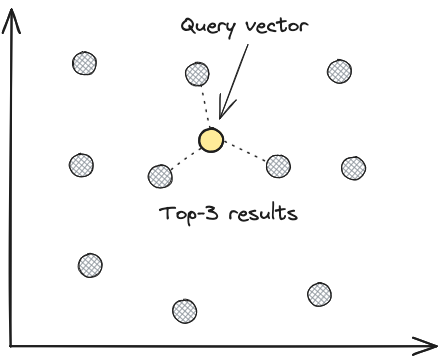
Bypass the Vector Index
Usebypass_vector_index to get exact, ground-truth results by performing exhaustive searches across all vectors. Instead of relying on approximate methods, the system directly compares your query against every vector in the table, ensuring 100% recall at the cost of increased query time.
This skips the approximate index and checks every single vector for exact, ground-truth results.
The .bypass_vector_index() method forces LanceDB to perform an exhaustive search through all vectors instead of using the approximate nearest neighbor index, ensuring exact results but at the cost of slower performance.
The output is a query result with the top 5 exact matches, guaranteeing 100% recall but taking longer to run.
This approach is particularly useful when:
- Evaluating ANN index quality
- Calculating recall metrics to tune index parameters
- Ensuring exact results for critical applications