

Storage backend selection guide
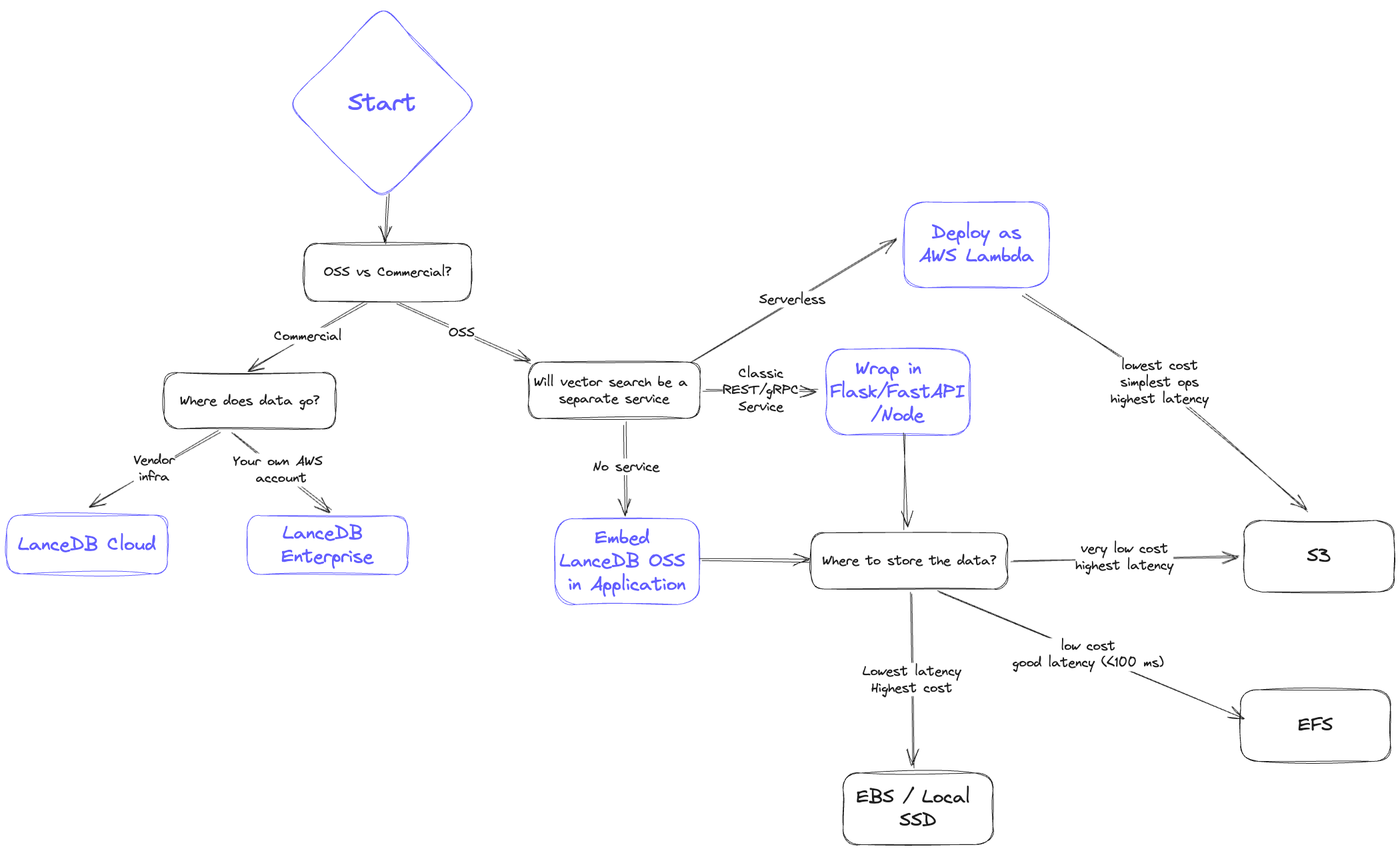
- Latency: How fast do I need results? What do the p50 and p95 look like?
- Scalability: Can I scale data volume and QPS easily?
- Cost: What is the all-in cost of storage plus serving?
- Reliability/Availability: How will replication and disaster recovery work?
Storage backend comparison
Below is a high-level comparison ordered from lowest cost to lowest latency.1. Object storage (S3 / GCS / Azure Blob)
- Latency: Highest; expect hundreds of milliseconds and higher p95.
- Scalability: Effectively unlimited storage; QPS bound by concurrency limits.
- Cost: Lowest overall.
- Reliability/Availability: Highly available, backed by cloud SLAs.
Concurrent writers on S3S3 and S3 Express now support atomic writes natively, so LanceDB handles concurrent writers against the same table out-of-the-box — no external commit coordinator is required. Bucket-level server-side encryption with KMS and S3 Express One Zone are also supported on this tier.
2. File storage (EFS / GCS Filestore / Azure File)
- Latency: Better than object storage; p95 under ~<100ms is typical.
- Scalability: High, but limited by provisioned IOPS per volume.
- Cost: More than object storage but cheaper than in-memory options; cold data can tier down automatically.
- Reliability/Availability: Highly available; replication/backup must be managed separately.
3. Third-party storage (e.g., MinIO, WekaFS)
- Latency: Similar to EFS; typically under <100ms.
- Scalability: Determined by the chosen vendor’s cluster sizing.
- Cost: Higher than S3; may edge above EFS at larger scales.
- Reliability/Availability: Shareable across many nodes; replication depends on vendor capabilities.
4. Block storage (EBS / GCP Persistent Disk / Azure Managed Disk)
- Latency: Near-local performance; often <30ms.
- Scalability: Not shareable across instances; shard or copy data when scaling.
- Cost: Higher than networked file systems, plus potential I/O charges.
- Reliability/Availability: Persists through instance restarts; backups and sharding must be managed.
5. Local storage (SSD / NVMe)
- Latency: Fastest; p95 often under <10ms.
- Scalability: Hard to scale in cloud environments; requires sharding or additional copies for higher QPS.
- Cost: Highest; tightly coupling compute and storage makes horizontal scaling difficult.
- Reliability/Availability: Data is tied to the instance; backups must be rigorous.
File-format choices that interact with the backend
A fewstorage_options keys shape new tables in ways that depend on the backend you picked above. They are documented in full on the configuration page; the architecture-level summary is:
new_table_enable_v2_manifest_pathsmatters most on object stores, where opening a table with many versions is dominated by listing cost. Leave it off for backward compatibility with clients older than LanceDB 0.10.0.new_table_enable_stable_row_idskeeps row IDs stable across compaction, delete, and merge. The choice is independent of the backend but affects any system that joins on row ID.new_table_data_storage_versionselects the on-disk format. The defaultstableis recommended for all new tables; picklegacyonly when older readers must keep working.