

Do you need one?
Not always. LanceDB’s disk-based brute-force kNN search is fast even without an index: computing 100K pairs of 1000-dimension vectors takes under 20ms in benchmarks. For datasets around 100K rows or fewer, or applications that can accept ~100ms latency, a vector index is usually unnecessary overhead. Build one once a table passes roughly a million rows, dimensionality is high, or query latency matters more than that. Seebypass_vector_index to run an exact search
side-by-side and measure whether an index is worth it for your data.
Choosing the Right Index
LanceDB vector indexes are combined with several quantization techniques to admit efficient storage. The following table lists provided quantized vector indexes and their common use cases. You can specify index type manually in Lance withindex_type.
Understanding Vector Indexes
LanceDB offers two vector indexes, which can be created on any numeric Lance dataset: Inverted File (IVF) and Hierarchical Navigable Small World (HNSW).IVF
The Inverted File Index (IVF) accelerates ANN searches by drastically reducing the search space. The index consists of a small set of centroids corresponding to an approximate solution to the -means clustering problem. Each vector remembers its nearest centroid, and each centroid remembers its associated set of vectors, called its partition.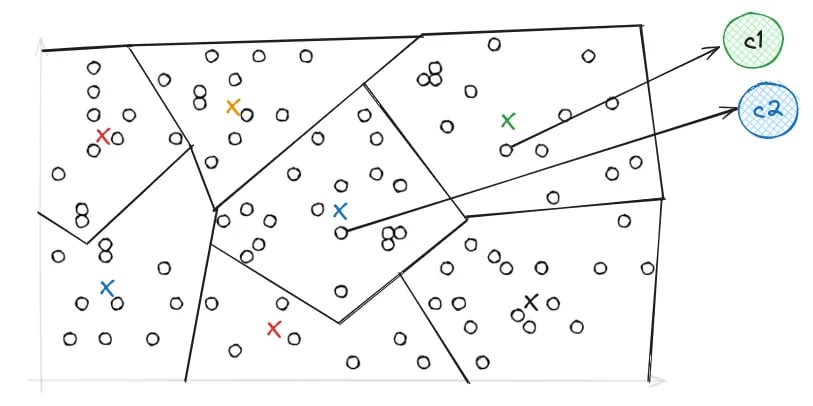
Example partition of a geometric space, with colored marks denoting centroids.
nprobes parameter, which specifies the number of partitions searched.
A higher probe budget searches more partitions, which can improve recall at
higher CPU and I/O cost.
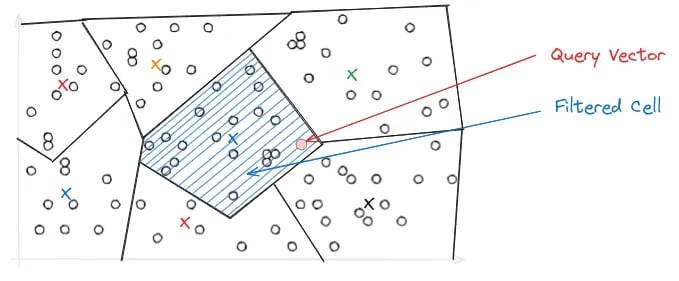
Edge case for single-partition brute force.
HNSW
Hierarchical Navigable Small World (HNSW) constructs a layered graph hierarchy on the vector set, with edges representing distances. We can visualize an HNSW index as a vertical stack of graphs, with the top layer having very few edges and each other layer having a multiplicative factor more edges than the layer above it. High layers of a HNSW hierarchy represent sparse, higher-distance networks, and lower layers represent finer, lower-distance networks. To query a vector , the index proceeds iteratively through layers, first finding ‘s nearest neighbor in the graph, then proceeding recursively through the induced subhierarchy until the lowest layer is reached.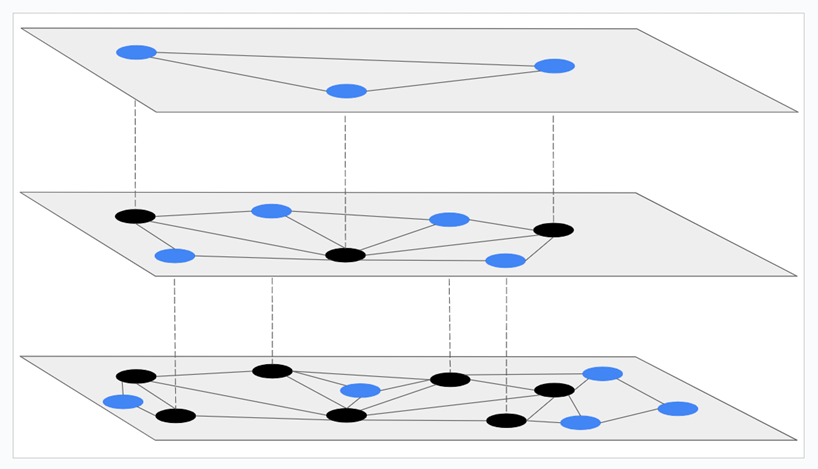
HNSW hierarchy: sparse network at the top layer, fine network at the bottom.
IVF + HNSWIn LanceDB, HNSW is not exposed as a top-level vector index. Instead, it’s available as a substructure which
further indexes the selected vectors inside each IVF partition.
This combines the scalability of IVF with the high recall of HNSW.
LanceDB supports IVF-HNSW-based quantized indexes
IVF_HNSW_FLAT, IVF_HNSW_PQ, and IVF_HNSW_SQ; a deployment builds only IVF_HNSW_SQ.Using Vector Indexes
Learn how to configure, build, and search LanceDB vector indexes, including build and search time parameters, asynchronous objects, and several examples.Configuration
Build-time Parameters
Search-time Parameters
The
distance_type can be specified at search time in addition to build time. If
you do this, set it to the same value used to build the vector index. If the search
metric does not match the index metric, LanceDB cannot use the index and falls
back to a costly flat search. On LanceDB Cloud (legacy hosted service), the brute-force KNN safety limit
can reject that search on a large table instead of executing it. An Enterprise
deployment applies the same limit only when it is configured to.When the search metric is omitted, current SDKs use the index metric if an index
is available. Some older SDK versions sent l2 when it was omitted, so explicitly
set the matching metric or upgrade the SDK when querying a non-l2 index with an
older client.nprobes behavior by index type:
Start with Auto, then measure recall and latency before changing probe settings.
If you set both
search_effort and nprobes, effort takes precedence. Explicit
min/max bounds still apply; equal bounds fix the count. See
tuning vector search for examples and
guidance on choosing these controls.distance_range:
bypass_vector_index:
Use bypass_vector_index to compute an exact kNN result. Note that exact queries may be prohibitively slow on production scales.
Multivector indexing currently requires
distance_type="cosine". Use bypass_vector_index() for non-cosine queries on a multivector column. See Multivector Search for the full rules.Async API and Config Objects
Create vector indexes asynchronously withawait table.create_index("vector", config=...). The config object
admits the same build-time parameters described above. Pass an instance of a Python config class from the table in Choosing the Right Index:
IVF Indexes
This example creates and queries anIVF_PQ index for a table of vectors with respect to cosine similarity.
Specify vector_column_name if you have multiple vector columns or non-default names.
TypeScript currently doesn’t support
IvfSq (IVF with Scalar Quantization).vector_column_name (e.g. image.embedding). The same path is used at query time and is what list_indices() reports under columns. See Selecting the vector column for the full path syntax.
IVF-HNSW Indexes
Beyond the general build-time parameters above, two additional parameters are specific to IVF-HNSW indexes:
Partition sizing follows the general
num_partitions/target_partition_size guidance above.
The snippet below builds and queries an IVF_HNSW_SQ index.
Managing Vector Indexes
Enterprise-only In LanceDB Enterprise, vector indexes are managed automatically. The system asynchronously updates and optimizes indexes as a background process:- Automatically manages indexing parameters and storage
- Can build an
IVF_PQindex automatically on a vector column the deployment is configured to index - GPU-based
IVF_PQbuilds are available on request. Contact support to enable them for your deployment. Build time depends on dataset size, dimensions and GPU resources.
table.create_index().
See the above sections for guidance on manually tuning index parameters as data changes.
In LanceDB Enterprise,
create_index() returns immediately and the vector index builds asynchronously.
To wait until all data is indexed, specify the wait_timeout parameter, or call wait_for_index(...) afterward.
It waits for the named index to exist and for index_stats(...) to report num_unindexed_rows == 0.
In the embedded library the index is built before create_index() returns.Rows appended after an initial index build remain outside the index until refreshed manually (Embedded) or automatically (Enterprise). Normal
search still checks those unindexed rows with a slower fallback path;
fast_search() skips that
fallback and searches only indexed rows.Operational checksIn the embedded library, use
optimize() after appends or other writes to fold new rows into existing indexes.
A deployment does this in the background, and optimize() is not available there.Check Index Status
In LanceDB Enterprise, vector index creation runs in the background and may take some time to complete. While it is ongoing, you can check its status through the API or the LanceDB Enterprise UI. In the LanceDB Enterprise UI, navigate to your table page - the “Index” column reflects each column’s index status: it is blank when no index exists, shows an “in progress” label while the index is being built, and shows the index type once the build completes. To check status programmatically, uselist_indices() and index_stats(). By default, the index name is formed by appending _idx to the column name (e.g., a keywords_embeddings column produces keywords_embeddings_idx). Note that list_indices() only returns information after the index is fully built.
Each entry returned by list_indices() also carries detailed per-index metadata, so you can inspect an index without a follow-up index_stats() call. Node.js exposes the same fields in camelCase (num_indexed_rows → numIndexedRows):
These fields are populated for LanceDB Embedded tables. In LanceDB Enterprise,
list_indices() returns them except num_unindexed_rows; use index_stats() for index coverage.Custom Index Names
The{column}_idx suffix is the default naming convention.
Pass name=... to create_index() to override it. Once set, the custom name will be reflected in list_indices(), index_stats(name), and wait_for_index([name]).
Quantization
Quantization is used in LanceDB to efficiently compress and store vector indexes. We discuss only the quantization techniques here; discussion of LanceDB vector indexes and quantized vector indexes can be found here.Quantization Techniques
LanceDB provides distinct quantization techniques: Product Quantization (PQ), RaBitQ Quantization (RQ), and Scalar Quantization (SQ). Recall that all quantizations perform lossy compression, in that they irreversibly lose some degree of precision to compactly store an index.Product Quantization (PQ)
To visualize PQ, assume a vector dataset has dimensions, with a chunk of a vector denoting a contiguous block of entries. Imagine that each vector has disjoint chunks of entries each, where the first chunk contains entries through , the second contains entries through , and so on. Now, for each , let represent the set containing chunk of each vector (entries to ). For each independently, a small set of centroids is computed corresponding to an approximate solution to the -means clustering problem. For each original vector in the dataset, every chunk is associated to its nearest centroid; thus, the vector itself is associated with the concatenation of centroids. We then gather all our centroids (from all chunks) into a single lookup table, and for each vector, we store the concatenation of IDs of its corresponding centroids. At query time, we need only to compare each chunk of the queried vector with our set of centroids.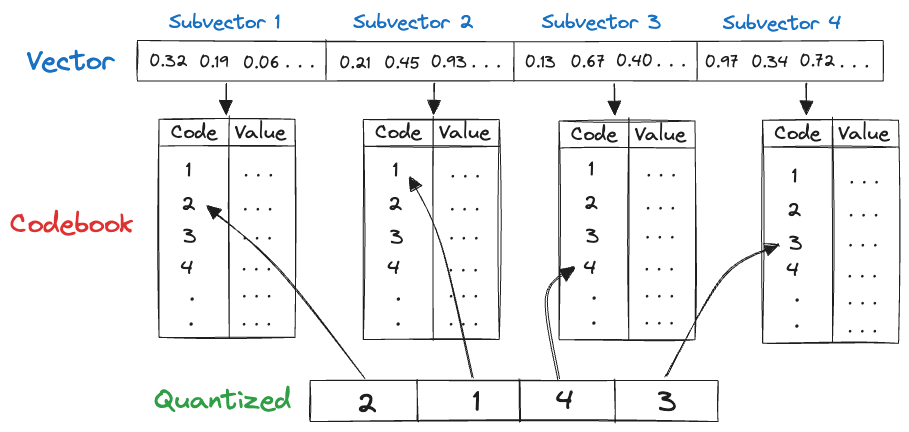
RaBitQ Quantization (RQ)
RaBitQ is an advanced quantization technique that outperforms PQ in several ways. It needs no codebook to train, estimates distances very quickly at query-time, and can quantize each vector in (with some small overhead) as little as one bit per dimension! In practice, RaBitQ compresses a -dimensionalfloat32 vector into just a few thousand bits, while maintaining good recall.
The inner workings of RaBitQ quantization are rather mathematically dense. It generates a quantization codebook by
applying a uniformly random, approximately distance-preserving orthogonal transformation of the vertices of the -dimensional hypercube,
where is the dimensionality of the dataset. We defer the details, and an elegant theoretical error bound, to the original paper.
Use RaBitQ quantization by selecting quantized index types ending in the suffix RQ. For example, import IvfRq from lancedb.index and call table.create_index("vector", config=IvfRq()).
Note that when using IVF_RQ, the dimension of the dataset must be a multiple of 8.
num_bits determines how many bits are used to quantize each dimension.
By default, Python, Rust, and Node leave this unset and inherit Lance’s default, currently 5 bits.
Higher values improve recall at the cost of additional storage and query-time compute.
To retain the previous one-bit default and maximum compression, explicitly set num_bits=1 (for example, IvfRq(num_bits=1) in Python).
Five-bit quantized vector codes use roughly five times the storage of one-bit codes; total index size also includes other overhead.
See this blog post for further discussion and benchmarking of LanceDB’s RaBitQ implementation.
Scalar Quantization (SQ)
Scalar quantization quantizes each entry of a vector independently, by simply replacing it with the closest of a pre-defined set of values. In practice, it often uses bits per dimension of a vector, and supports very fast encoding and decoding. For example, suppose we know all vector entries across our dataset lie in the range . In this case, we could quantize a given value as an -bit representation of the integer , where is the closest value to among all integral multiples .Quantization API Reference
max_iterations and sample_rate also affect quantizer training, but since they apply to every IVF/HNSW index type (not just quantized ones), they’re documented as general Build-time Parameters instead. All three are passed as keyword arguments to create_index, alongside index_type: