

Why a Geneva Console?
- Collaboration: The console helps multiple people work together. Individual jobs can be run in a notebook or workflow, but to collaborate on jobs, it helps to be able to see everything that’s running on a given database.
- History: See what has run in the past and diagnose any problems with your jobs.
- Shared resources: The console stores definitions of clusters and manifests, so you can easily tell what resources you want to use to run your job.
Getting Started
The Geneva console is installed with the Geneva Helm chart; contact LanceDB for access to the Helm chart.- Install or upgrade the Geneva Helm chart (see Helm Deployment).
- In your web browser, connect to the Geneva Console UI using the external ingress/load balancer URI configured in your deployment.
- Backup (no external ingress): if your deployment doesn’t expose the console via ingress or a load balancer, forward port 3000 from the
geneva-console-uiservice and openhttp://localhost:3000:
-n to specify the namespace you installed the Helm chart into. We advise lancedb.)
4. When prompted, enter your bucket and database, like:
What’s in the Console?
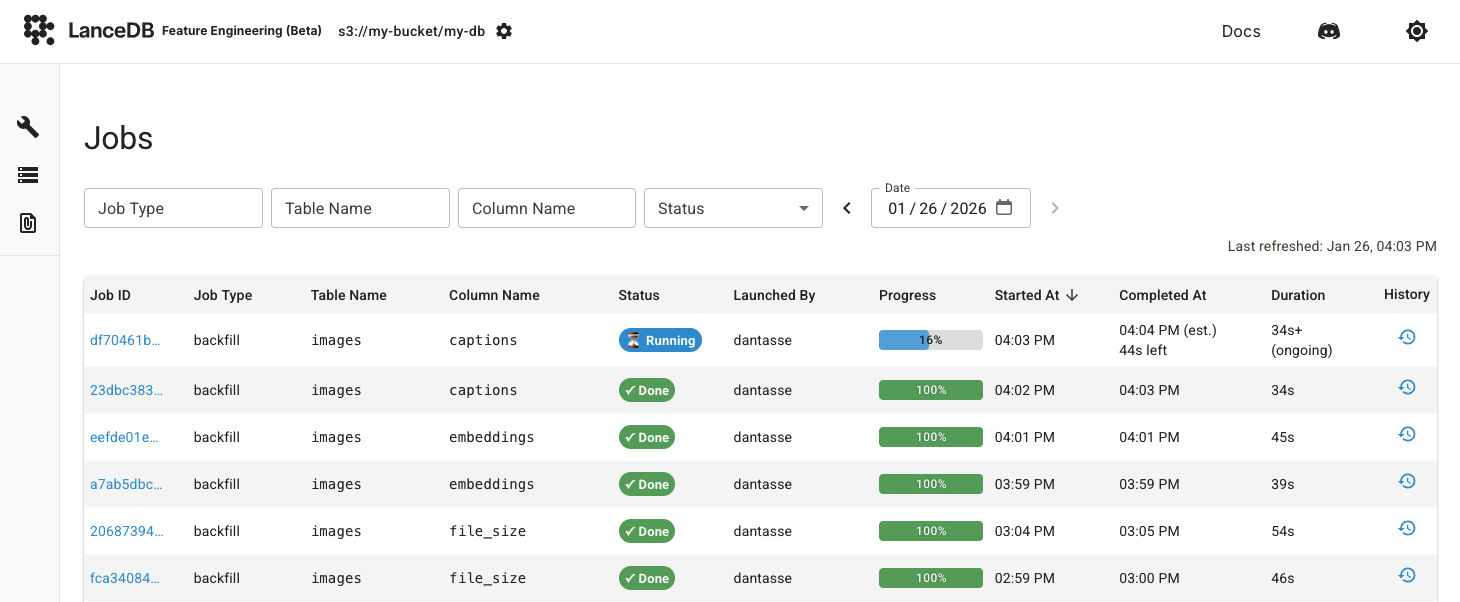
Jobs Overview
The heart of the console is an overview of all jobs that are running on a given database. See each job’s status, progress, timing, and initiator.Job Details
Click on a job’s ID to get more details, especially events that have happened in a job’s life cycle, and metrics such as number of workers, rows, and fragments written.Clusters
See the Geneva clusters that you have defined to run jobs. Because clusters can be reused by name, this view can help you run a new job with the same resource constraints as a previous job.Manifests
See the Manifests you’ve defined and what packages/dependencies they contain. As with clusters, manifests are reusable, so it’s easy to start a new job with the same dependencies as an old one by just specifying the manifest name.API Reference
- Connection —
get_job(),list_jobs(),list_clusters(),list_manifests() - Cluster —
GenevaClusterand cluster configuration classes - Manifest —
GenevaManifestand manifest builder classes