> ## Documentation Index
> Fetch the complete documentation index at: https://docs.lancedb.com/llms.txt
> Use this file to discover all available pages before exploring further.
# LeRobot Native Integration
> Train LeRobot policies straight from object storage, and curate, search and visualize robotics datasets as Lance tables.
export const PyFrameworksLerobotTrainReady = "import torch\n\ndataset = LeRobotDataset(\n \"lance-format/pusht-lance\",\n delta_timestamps={\"observation.image\": [-0.2, -0.1, 0.0]},\n return_uint8=True,\n)\nloader = torch.utils.data.DataLoader(dataset, batch_size=32, shuffle=True)\nbatch = next(iter(loader))\nprint(batch[\"observation.image\"].shape) # [32, 3, C, H, W]\n";
export const PyFrameworksLerobotOpenLanceTables = "import lancedb\n\ndb = lancedb.connect(\"hf://datasets/lance-format/pusht-lance\")\nframes = db.open_table(\"frames\")\nvideos = db.open_table(\"videos\")\n\nprint(frames.count_rows(), videos.count_rows())\nprint(frames.schema)\n";
export const PyFrameworksLerobotLoad = "from lerobot.datasets import LeRobotDataset\n\n# Hub dataset repo: storage_format in meta/info.json routes to the Lance reader\ndataset = LeRobotDataset(\"lance-format/pusht-lance\")\n\n# HF Storage Bucket, read in place, nothing downloaded\ndataset = LeRobotDataset(\"lance-format/lerobot-tests/pusht-lance\", repo_type=\"bucket\")\n\nsample = dataset[100]\nprint(sample[\"observation.state\"].shape)\nprint(sample[\"observation.image\"].shape)\n";
export const PyFrameworksLerobotFilterFrames = "frame_rows = (\n frames.search()\n .where(\"episode_index = 0 AND frame_index < 10\", prefilter=True)\n .select([\"episode_index\", \"frame_index\", \"timestamp\", \"action\"])\n .limit(10)\n .to_list()\n)\n\nfor row in frame_rows:\n print(row[\"episode_index\"], row[\"frame_index\"], row[\"timestamp\"])\n";
[LeRobot](https://huggingface.co/docs/lerobot/index) is Hugging Face's open-source robotics stack. LeRobot can read Lance datasets natively through the standard `LeRobotDataset` class and training pipeline. Setting `"storage_format": "lance"` in the dataset selects the Lance reader without changing how the rest of the workflow works.
What you get:
* **Train from object storage while keeping your GPUs fed.** Lance reads random frames straight from S3, GCS, the HF Hub or HF Storage Buckets, fetching only the bytes each batch needs. Every batch can be a global shuffle across the full dataset. In the table below (samples/s, 8 workers, batch 64), Lance and upstream local both draw every batch from the whole dataset. Upstream streaming does a reservoir shuffle, reading the dataset in order and drawing each batch from a pool of recently seen frames, so those two columns are not the same job:
| dataset | frames | cameras | Lance, S3 (global shuffle, samples/s) | upstream, local (global shuffle, samples/s) | speedup vs local | upstream, streaming (reservoir shuffle, samples/s) | speedup vs streaming |
| ---------------------- | ---------- | ------- | ------------------------------------- | ------------------------------------------- | ---------------- | -------------------------------------------------- | -------------------- |
| DROID | 27,630,375 | 3 | 2,258.5 | 346.7 | 6.5x | 898.6 | 1.7x |
| berkeley\_rpt | 392,578 | 1 | 1,740.6 | 1,209.9 | 1.4x | 274.5 | 6.3x |
| toto | 325,699 | 1 | 1,097.0 | 936.3 | 1.2x | 121.3 | 9.0x |
| roboturk | 187,507 | 1 | 1,276.8 | 1,082.3 | 1.2x | 128.2 | 10.0x |
| aloha\_mobile\_cabinet | 127,500 | 3 | 815.7 | 294.2 | 2.8x | 77.7 | 10.5x |
| koch\_pick\_place | 37,972 | 2 | 854.7 | 274.9 | 3.1x | 58.1 | 14.7x |
The gap grows with how much video each sample carries: about 1.2x with one camera, 2.8x with three, 6.5x on DROID.
* **Faster iteration, end to end.** 10,000 steps of SmolVLA on DROID, 8xH100, lerobot's default `num_workers=4`, same seed:
| | Lance, S3, nothing downloaded | upstream, local NVMe after a 384 GB download |
| ---------------------------------- | ----------------------------- | -------------------------------------------- |
| wall clock | **1 h 27 m** | 2 h 00 m |
| steady rate | 495 samples/s | 361 samples/s |
| of each step spent waiting on data | 1.7% | 37.4% |
| final loss | 0.2380 | 0.2380 |
Training reached the same result, but finished 33 minutes faster and avoided a 384 GB download upfront. The savings come from reducing the time GPUs spend waiting on data, so they compound over longer runs. At 100k steps, that adds up to more than five hours saved, and every re-run and sweep benefits again.
* **The training table is also the index.** Parquet has no secondary indexes, so finding frames instead of scanning them usually means another system per question, such as a vector database for embeddings, a search service for instructions, a feature store for scores. With Lance, those are columns and indexes on the same table the DataLoader reads. One query spans all of them, at a version the trainer can reopen.
## Install
```bash theme={"theme":{"light":"vitesse-light","dark":"catppuccin-mocha"}}
pip install "lerobot[lancedb]" # the reader, inside lerobot itself
pip install "lerobot[lancedb-convert]" # to convert LeRobot datasets to Lance
```
On macOS, use Python 3.12 or 3.13. Lance datasets with RGB video require TorchCodec, which does not fall back to PyAV in the Lance reader. If TorchCodec cannot load FFmpeg, install FFmpeg 8:
```bash theme={"theme":{"light":"vitesse-light","dark":"catppuccin-mocha"}}
brew install ffmpeg@8
export PATH="$(brew --prefix ffmpeg@8)/bin:$PATH"
export DYLD_LIBRARY_PATH="$(brew --prefix ffmpeg@8)/lib:$DYLD_LIBRARY_PATH"
```
Verify with `python -c "import torchcodec"`.
## Convert a dataset
Any LeRobot v3.0 dataset, from the Hub or a local directory:
```bash theme={"theme":{"light":"vitesse-light","dark":"catppuccin-mocha"}}
lerobot-lance-convert --repo-id lerobot/pusht --out ./pusht-lance
```
**Migration takes about as long as copying the files.** Videos are stored as blobs without re-encoding, so items are bit-identical to the source. For example, 392,578 frames convert in 10 seconds, DROID's 27.6M in 34 minutes. Nothing about your recording or training code changes. The output keeps `meta/` as is and adds three Lance tables (`frames`, `videos`, `meta`). `lerobot-lance-doctor` audits the result and often finds problems in the source. For example, DROID carries 44% orphaned rows, and three of eight public datasets we converted have frame-count defects that random access exposes.
Host the result anywhere: an HF dataset repo (`hf upload`, tag it `v3.0`), an HF Storage Bucket (`hf buckets sync`), or any object store (`aws s3 sync`).
## Load and train
{PyFrameworksLerobotLoad}
An explicit `root` works for any object store: `LeRobotDataset("lerobot/pusht", root="s3://my-bucket/pusht-lance")`. Remote roots download only `meta/`. Data is fetched per batch. Temporal windows, `DataLoader` and the rest of the training stack work unchanged:
{PyFrameworksLerobotTrainReady}
Or from the CLI. Held-out evaluation on a remote dataset needs random access, so it only works on the Lance path:
```bash theme={"theme":{"light":"vitesse-light","dark":"catppuccin-mocha"}}
lerobot-train \
--dataset.repo_id=my-org/my-bucket/pusht-lance \
--dataset.repo_type=bucket \
--dataset.eval_split=0.02 \
--policy.type=act
```
## Visualize your training data directly in Foxglove
LeRobot's dataset viewer can serve an episode to [Foxglove](https://foxglove.dev) over its WebSocket protocol ([lerobot#4542](https://github.com/huggingface/lerobot/pull/4542)), and with a Lance dataset it works wherever the data lives:
```bash theme={"theme":{"light":"vitesse-light","dark":"catppuccin-mocha"}}
lerobot-dataset-viz --repo-id lance-format/pusht-lance --episode-index 3 --display-mode foxglove
```
Open the Foxglove app, connect to `ws://localhost:8765`, and scrub. Cameras, joint state and actions show up as topics you can lay out however you like:
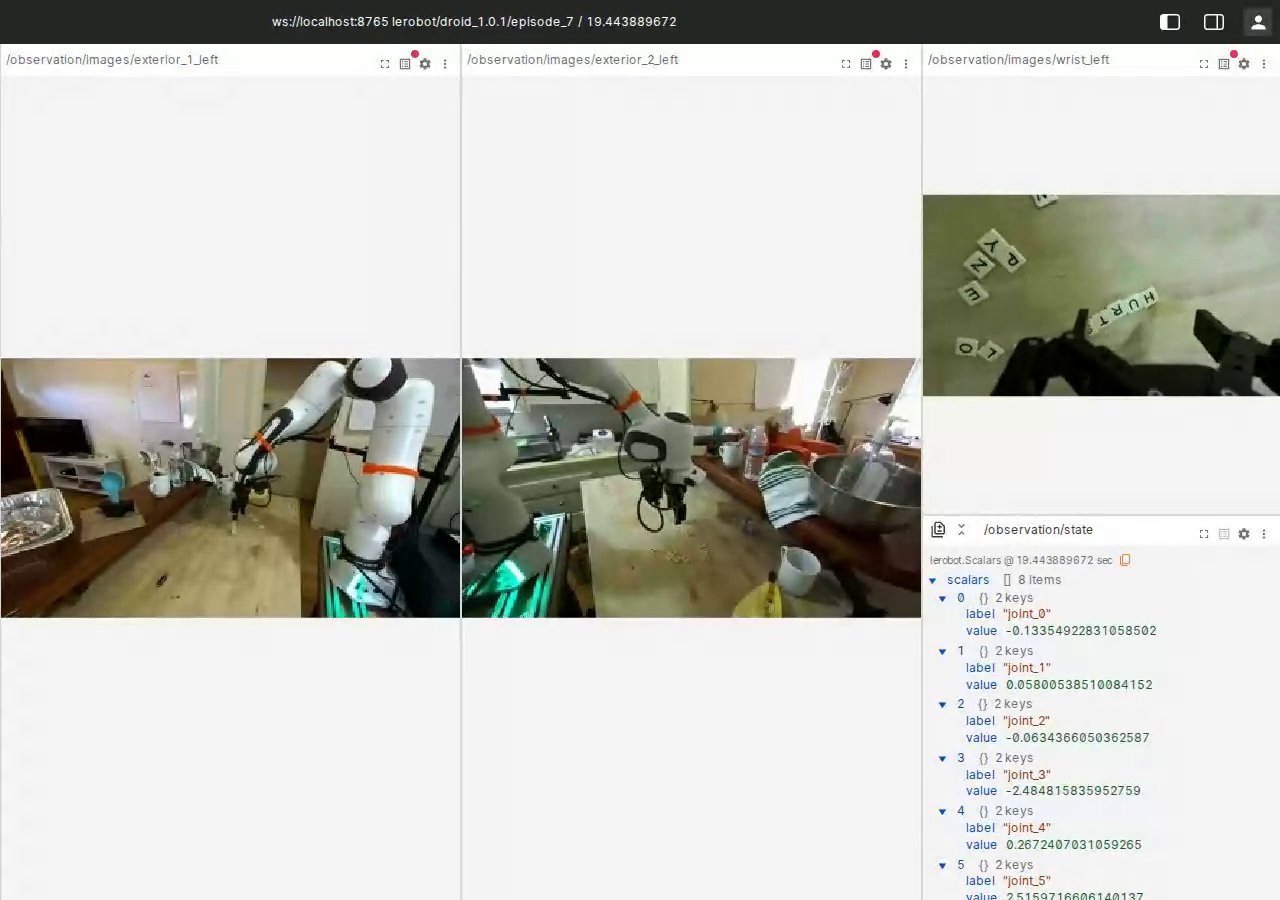 Foxglove loads only the frames you’re viewing, so opening one episode from the 373 GB DROID dataset transfers just a few MB from S3. You don’t need to export to MCAP or download the full dataset. Foxglove reads the same Lance data that training uses.
## Query, curate, enrich
The frames table is a LanceDB table like any other:
{PyFrameworksLerobotOpenLanceTables}
Filter with SQL over any feature, using the indexes built at conversion:
{PyFrameworksLerobotFilterFrames}
From here it is standard LanceDB. The examples below are from our DROID walkthrough, all on the table the trainer reads.
**Derived columns are added without rewriting existing data.** With [Geneva](/geneva/udfs/udfs), `add_columns` registers a Python function and its input columns as a new derived column. No values are computed at that point. `backfill` computes and stores the derived values later, in parallel, without rewriting the existing columns or video blobs:
```python theme={"theme":{"light":"vitesse-light","dark":"catppuccin-mocha"}}
@udf(data_type=pa.float32(), input_columns=["action_joint_velocity"])
def jerk_score(v): # per-frame motion roughness
...
tbl.add_columns({"jerk_score": jerk_score}) # nothing computed yet
tbl.backfill("jerk_score", concurrency=8) # 610,403 rows in 16.7 s
```
Embeddings work the same way, reading frames straight from the video blobs in the same table:
```python theme={"theme":{"light":"vitesse-light","dark":"catppuccin-mocha"}}
@udf(data_type=pa.list_(pa.float32(), 768), num_gpus=1,
input_columns=["episode_index", "frame_index"])
class EmbedFromBlob: # SigLIP2 loads once per worker
def __call__(self, episode_index, frame_index):
blob = self.videos.take_blobs("video_bytes", indices=[vrow])[0]
frame = VideoDecoder(blob).get_frames_at([pos]).data[0]
...
```
**Search** is an index on those columns: a vector index over the embeddings built in 29.7 s across 27.6M rows, a full-text index over the instructions in 7.0 s, queries in 10 to 54 ms.
**Curation** is one query across all of it. Semantic search with a predicate on the derived score without a join:
```python theme={"theme":{"light":"vitesse-light","dark":"catppuccin-mocha"}}
tbl.search(vec("a gripper closing on an object"), vector_column_name="emb_siglip2") \
.where("jerk_score > 1.2875") # the roughest 1% of frames
.limit(4)
```
**Mining** is the same query pointed at the rare cases. `tbl.search().where("jerk_score > 1.2875 AND success = false")` pulls the rough, failed frames out of 27.6M rows in milliseconds, ready to become a fine-tuning set or a labeling queue.
**EDA** is a scan of the tabular columns: a pass over all 27.6M rows reads 2.52 GB in 190 s and decodes no video.
Then drop what you found from training with `episodes=[...]` instead of rewriting files. The reader ignores columns it does not know, and the table is versioned, so curation and training share one copy of the data at a version you can reopen.
Lance datasets are read-only in LeRobot: record and edit in the default format, then convert.
You can try the examples above with [`lance-format/pusht-lance`](https://huggingface.co/datasets/lance-format/pusht-lance) and other datasets in the [`lance-format`](https://huggingface.co/lance-format) organization.
Foxglove loads only the frames you’re viewing, so opening one episode from the 373 GB DROID dataset transfers just a few MB from S3. You don’t need to export to MCAP or download the full dataset. Foxglove reads the same Lance data that training uses.
## Query, curate, enrich
The frames table is a LanceDB table like any other:
{PyFrameworksLerobotOpenLanceTables}
Filter with SQL over any feature, using the indexes built at conversion:
{PyFrameworksLerobotFilterFrames}
From here it is standard LanceDB. The examples below are from our DROID walkthrough, all on the table the trainer reads.
**Derived columns are added without rewriting existing data.** With [Geneva](/geneva/udfs/udfs), `add_columns` registers a Python function and its input columns as a new derived column. No values are computed at that point. `backfill` computes and stores the derived values later, in parallel, without rewriting the existing columns or video blobs:
```python theme={"theme":{"light":"vitesse-light","dark":"catppuccin-mocha"}}
@udf(data_type=pa.float32(), input_columns=["action_joint_velocity"])
def jerk_score(v): # per-frame motion roughness
...
tbl.add_columns({"jerk_score": jerk_score}) # nothing computed yet
tbl.backfill("jerk_score", concurrency=8) # 610,403 rows in 16.7 s
```
Embeddings work the same way, reading frames straight from the video blobs in the same table:
```python theme={"theme":{"light":"vitesse-light","dark":"catppuccin-mocha"}}
@udf(data_type=pa.list_(pa.float32(), 768), num_gpus=1,
input_columns=["episode_index", "frame_index"])
class EmbedFromBlob: # SigLIP2 loads once per worker
def __call__(self, episode_index, frame_index):
blob = self.videos.take_blobs("video_bytes", indices=[vrow])[0]
frame = VideoDecoder(blob).get_frames_at([pos]).data[0]
...
```
**Search** is an index on those columns: a vector index over the embeddings built in 29.7 s across 27.6M rows, a full-text index over the instructions in 7.0 s, queries in 10 to 54 ms.
**Curation** is one query across all of it. Semantic search with a predicate on the derived score without a join:
```python theme={"theme":{"light":"vitesse-light","dark":"catppuccin-mocha"}}
tbl.search(vec("a gripper closing on an object"), vector_column_name="emb_siglip2") \
.where("jerk_score > 1.2875") # the roughest 1% of frames
.limit(4)
```
**Mining** is the same query pointed at the rare cases. `tbl.search().where("jerk_score > 1.2875 AND success = false")` pulls the rough, failed frames out of 27.6M rows in milliseconds, ready to become a fine-tuning set or a labeling queue.
**EDA** is a scan of the tabular columns: a pass over all 27.6M rows reads 2.52 GB in 190 s and decodes no video.
Then drop what you found from training with `episodes=[...]` instead of rewriting files. The reader ignores columns it does not know, and the table is versioned, so curation and training share one copy of the data at a version you can reopen.
Lance datasets are read-only in LeRobot: record and edit in the default format, then convert.
You can try the examples above with [`lance-format/pusht-lance`](https://huggingface.co/datasets/lance-format/pusht-lance) and other datasets in the [`lance-format`](https://huggingface.co/lance-format) organization.