> ## Documentation Index
> Fetch the complete documentation index at: https://docs.lancedb.com/llms.txt
> Use this file to discover all available pages before exploring further.
# Storage Architecture in LanceDB
> Understand LanceDB storage backends, tradeoffs, and how to pick the right option for your latency, scale, and cost goals.
LanceDB is one of the few vector databases built on modular, disk-first components. That design makes it flexible enough to run across local NVMe, EBS, EFS, and any object store that exposes an S3-compatible API.
Choosing a backend is a balance between latency, scalability, cost, and operational complexity. Use this guide to pick the right fit for your workload.
## Storage backend selection guide
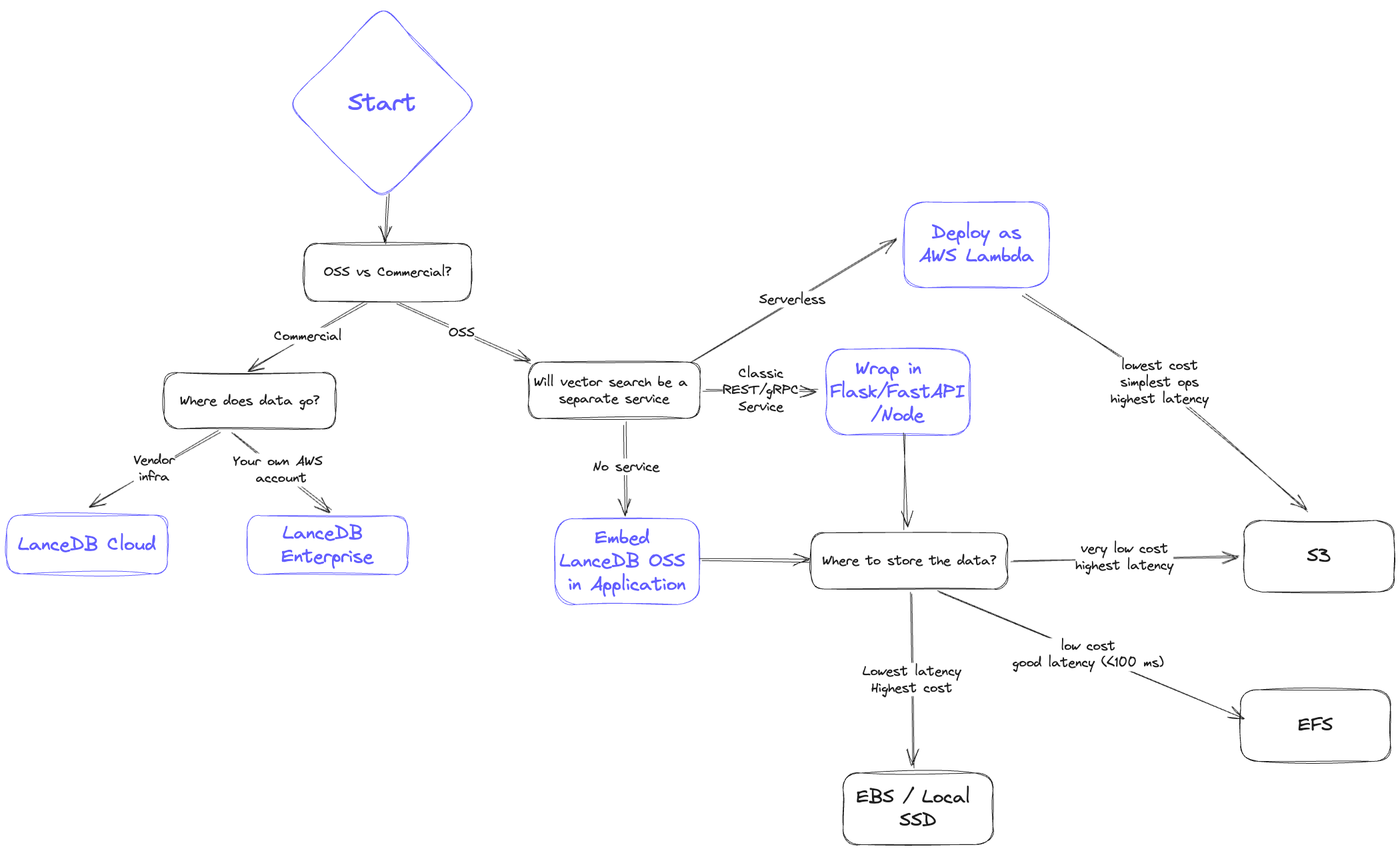 When architecting your system, ask yourself:
* **Latency**: How fast do I need results? What do the p50 and p95 look like?
* **Scalability**: Can I scale data volume and QPS easily?
* **Cost**: What is the all-in cost of storage plus serving?
* **Reliability/Availability**: How will replication and disaster recovery work?
## Storage backend comparison
Below is a high-level comparison ordered from lowest cost to lowest latency.
### 1. Object storage (S3 / GCS / Azure Blob)
* **Latency**: Highest; expect hundreds of milliseconds and higher p95.
* **Scalability**: Effectively unlimited storage; QPS bound by concurrency limits.
* **Cost**: Lowest overall.
* **Reliability/Availability**: Highly available, backed by cloud SLAs.
LanceDB separates storage and compute and writes immutable fragments, making it a strong fit for stateless, horizontally scalable deployments.
**Concurrent writers on S3**
S3 and S3 Express now support atomic writes natively, so LanceDB handles concurrent writers against the same table out-of-the-box — no external commit coordinator is required. Bucket-level [server-side encryption with KMS](/storage/configuration#server-side-encryption-with-kms) and [S3 Express One Zone](/storage/configuration#s3-express) are also supported on this tier.
### 2. File storage (EFS / GCS Filestore / Azure File)
* **Latency**: Better than object storage; p95 under \~\<100ms is typical.
* **Scalability**: High, but limited by provisioned IOPS per volume.
* **Cost**: More than object storage but cheaper than in-memory options; cold data can tier down automatically.
* **Reliability/Availability**: Highly available; replication/backup must be managed separately.
Keep a copy of data in object storage for disaster recovery. If zero downtime is required, provision a second network file system with replicated data.
### 3. Third-party storage (e.g., MinIO, WekaFS)
* **Latency**: Similar to EFS; typically under \<100ms.
* **Scalability**: Determined by the chosen vendor’s cluster sizing.
* **Cost**: Higher than S3; may edge above EFS at larger scales.
* **Reliability/Availability**: Shareable across many nodes; replication depends on vendor capabilities.
### 4. Block storage (EBS / GCP Persistent Disk / Azure Managed Disk)
* **Latency**: Near-local performance; often \<30ms.
* **Scalability**: Not shareable across instances; shard or copy data when scaling.
* **Cost**: Higher than networked file systems, plus potential I/O charges.
* **Reliability/Availability**: Persists through instance restarts; backups and sharding must be managed.
### 5. Local storage (SSD / NVMe)
* **Latency**: Fastest; p95 often under \<10ms.
* **Scalability**: Hard to scale in cloud environments; requires sharding or additional copies for higher QPS.
* **Cost**: Highest; tightly coupling compute and storage makes horizontal scaling difficult.
* **Reliability/Availability**: Data is tied to the instance; backups must be rigorous.
Use local disk only when you need extremely low latency and are comfortable owning the operational overhead.
## File-format choices that interact with the backend
A few `storage_options` keys shape new tables in ways that depend on the backend you picked above. They are documented in full on the [configuration page](/storage/configuration#new-table-configuration); the architecture-level summary is:
* `new_table_enable_v2_manifest_paths` matters most on object stores, where opening a table with many versions is dominated by listing cost. Leave it off for backward compatibility with clients older than LanceDB 0.10.0.
* `new_table_enable_stable_row_ids` keeps row IDs stable across compaction, delete, and merge. The choice is independent of the backend but affects any system that joins on row ID.
* `new_table_data_storage_version` selects the on-disk format. The default `stable` is recommended for all new tables; pick `legacy` only when older readers must keep working.
When architecting your system, ask yourself:
* **Latency**: How fast do I need results? What do the p50 and p95 look like?
* **Scalability**: Can I scale data volume and QPS easily?
* **Cost**: What is the all-in cost of storage plus serving?
* **Reliability/Availability**: How will replication and disaster recovery work?
## Storage backend comparison
Below is a high-level comparison ordered from lowest cost to lowest latency.
### 1. Object storage (S3 / GCS / Azure Blob)
* **Latency**: Highest; expect hundreds of milliseconds and higher p95.
* **Scalability**: Effectively unlimited storage; QPS bound by concurrency limits.
* **Cost**: Lowest overall.
* **Reliability/Availability**: Highly available, backed by cloud SLAs.
LanceDB separates storage and compute and writes immutable fragments, making it a strong fit for stateless, horizontally scalable deployments.
**Concurrent writers on S3**
S3 and S3 Express now support atomic writes natively, so LanceDB handles concurrent writers against the same table out-of-the-box — no external commit coordinator is required. Bucket-level [server-side encryption with KMS](/storage/configuration#server-side-encryption-with-kms) and [S3 Express One Zone](/storage/configuration#s3-express) are also supported on this tier.
### 2. File storage (EFS / GCS Filestore / Azure File)
* **Latency**: Better than object storage; p95 under \~\<100ms is typical.
* **Scalability**: High, but limited by provisioned IOPS per volume.
* **Cost**: More than object storage but cheaper than in-memory options; cold data can tier down automatically.
* **Reliability/Availability**: Highly available; replication/backup must be managed separately.
Keep a copy of data in object storage for disaster recovery. If zero downtime is required, provision a second network file system with replicated data.
### 3. Third-party storage (e.g., MinIO, WekaFS)
* **Latency**: Similar to EFS; typically under \<100ms.
* **Scalability**: Determined by the chosen vendor’s cluster sizing.
* **Cost**: Higher than S3; may edge above EFS at larger scales.
* **Reliability/Availability**: Shareable across many nodes; replication depends on vendor capabilities.
### 4. Block storage (EBS / GCP Persistent Disk / Azure Managed Disk)
* **Latency**: Near-local performance; often \<30ms.
* **Scalability**: Not shareable across instances; shard or copy data when scaling.
* **Cost**: Higher than networked file systems, plus potential I/O charges.
* **Reliability/Availability**: Persists through instance restarts; backups and sharding must be managed.
### 5. Local storage (SSD / NVMe)
* **Latency**: Fastest; p95 often under \<10ms.
* **Scalability**: Hard to scale in cloud environments; requires sharding or additional copies for higher QPS.
* **Cost**: Highest; tightly coupling compute and storage makes horizontal scaling difficult.
* **Reliability/Availability**: Data is tied to the instance; backups must be rigorous.
Use local disk only when you need extremely low latency and are comfortable owning the operational overhead.
## File-format choices that interact with the backend
A few `storage_options` keys shape new tables in ways that depend on the backend you picked above. They are documented in full on the [configuration page](/storage/configuration#new-table-configuration); the architecture-level summary is:
* `new_table_enable_v2_manifest_paths` matters most on object stores, where opening a table with many versions is dominated by listing cost. Leave it off for backward compatibility with clients older than LanceDB 0.10.0.
* `new_table_enable_stable_row_ids` keeps row IDs stable across compaction, delete, and merge. The choice is independent of the backend but affects any system that joins on row ID.
* `new_table_data_storage_version` selects the on-disk format. The default `stable` is recommended for all new tables; pick `legacy` only when older readers must keep working.