> ## Documentation Index
> Fetch the complete documentation index at: https://docs.lancedb.com/llms.txt
> Use this file to discover all available pages before exploring further.
# Storage Architecture in LanceDB
> Understand LanceDB storage backends, tradeoffs, and how to pick the right option for your latency, scale, and cost goals.
LanceDB's storage layer is built on modular, disk-first components. That design makes it flexible enough to run across local NVMe, EBS, EFS, and any object store that exposes an S3-compatible API. It also supports region-specific backends such as [Tencent COS](/storage/configuration#tencent-cos) and cache-acceleration layers such as [GooseFS](/storage/configuration#goosefs).
Choosing a backend is a balance between latency, scalability, cost, and operational complexity. Use this guide to pick the right fit for your workload.
## Storage backend selection guide
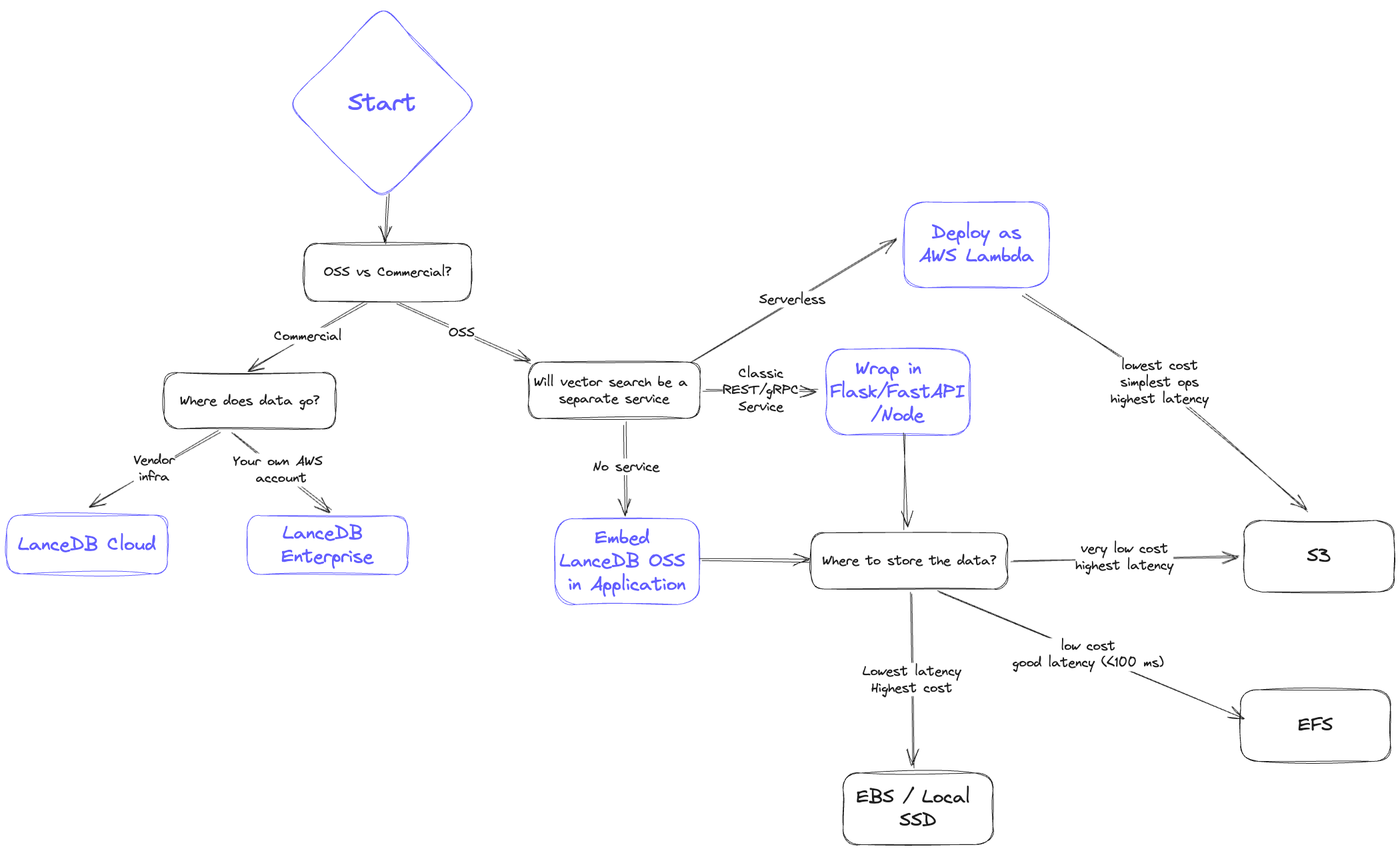 When architecting your system, ask yourself:
* **Latency**: How fast do I need results? What do the p50 and p95 look like?
* **Scalability**: Can I scale data volume and QPS easily?
* **Cost**: What is the all-in cost of storage plus serving?
* **Reliability/Availability**: How will replication and disaster recovery work?
## Storage backend comparison
Below is a high-level comparison ordered from lowest cost to lowest latency.
### 1. Object storage (S3 / GCS / Azure Blob)
* **Latency**: Highest; expect hundreds of milliseconds and higher p95.
* **Scalability**: Effectively unlimited storage; QPS bound by concurrency limits.
* **Cost**: Lowest overall.
* **Reliability/Availability**: Highly available, backed by cloud SLAs.
LanceDB separates storage and compute and writes immutable fragments, making it a strong fit for stateless, horizontally scalable deployments.
**Concurrent writers on S3**
S3 and S3 Express now support atomic writes natively, so LanceDB handles concurrent writers against the same table out-of-the-box — no external commit coordinator is required. Bucket-level [server-side encryption with KMS](/storage/configuration#server-side-encryption-with-kms) and [S3 Express One Zone](/storage/configuration#s3-express) are also supported on this tier.
### 2. File storage (EFS / GCS Filestore / Azure File)
* **Latency**: Better than object storage; p95 under \~\<100ms is typical.
* **Scalability**: High, but limited by provisioned IOPS per volume.
* **Cost**: More than object storage but cheaper than in-memory options; cold data can tier down automatically.
* **Reliability/Availability**: Highly available; replication/backup must be managed separately.
Keep a copy of data in object storage for disaster recovery. If zero downtime is required, provision a second network file system with replicated data.
### 3. Third-party storage (e.g., MinIO, WekaFS)
* **Latency**: Similar to EFS; typically under \<100ms.
* **Scalability**: Determined by the chosen vendor’s cluster sizing.
* **Cost**: Higher than S3; may edge above EFS at larger scales.
* **Reliability/Availability**: Shareable across many nodes; replication depends on vendor capabilities.
### 4. Block storage (EBS / GCP Persistent Disk / Azure Managed Disk)
* **Latency**: Near-local performance; often \<30ms.
* **Scalability**: Not shareable across instances; shard or copy data when scaling.
* **Cost**: Higher than networked file systems, plus potential I/O charges.
* **Reliability/Availability**: Persists through instance restarts; backups and sharding must be managed.
### 5. Local storage (SSD / NVMe)
* **Latency**: Fastest; p95 often under \<10ms.
* **Scalability**: Hard to scale in cloud environments; requires sharding or additional copies for higher QPS.
* **Cost**: Highest; tightly coupling compute and storage makes horizontal scaling difficult.
* **Reliability/Availability**: Data is tied to the instance; backups must be rigorous.
Use local disk only when you need extremely low latency and are comfortable owning the operational overhead.
## File-format choices that interact with the backend
A few `storage_options` keys shape new tables in ways that depend on the backend you picked above. They are documented in full on the [configuration page](/storage/configuration#new-table-configuration); the architecture-level summary is:
* `new_table_enable_v2_manifest_paths` matters most on object stores, where opening a table with many versions is dominated by listing cost. Leave it off for backward compatibility with clients older than LanceDB 0.10.0.
* `new_table_enable_stable_row_ids` keeps row IDs stable across compaction, delete, and merge. The choice is independent of the backend but affects any system that joins on row ID.
* `new_table_data_storage_version` selects the on-disk format. The default `stable` is recommended for all new tables; pick `legacy` only when older readers must keep working.
When architecting your system, ask yourself:
* **Latency**: How fast do I need results? What do the p50 and p95 look like?
* **Scalability**: Can I scale data volume and QPS easily?
* **Cost**: What is the all-in cost of storage plus serving?
* **Reliability/Availability**: How will replication and disaster recovery work?
## Storage backend comparison
Below is a high-level comparison ordered from lowest cost to lowest latency.
### 1. Object storage (S3 / GCS / Azure Blob)
* **Latency**: Highest; expect hundreds of milliseconds and higher p95.
* **Scalability**: Effectively unlimited storage; QPS bound by concurrency limits.
* **Cost**: Lowest overall.
* **Reliability/Availability**: Highly available, backed by cloud SLAs.
LanceDB separates storage and compute and writes immutable fragments, making it a strong fit for stateless, horizontally scalable deployments.
**Concurrent writers on S3**
S3 and S3 Express now support atomic writes natively, so LanceDB handles concurrent writers against the same table out-of-the-box — no external commit coordinator is required. Bucket-level [server-side encryption with KMS](/storage/configuration#server-side-encryption-with-kms) and [S3 Express One Zone](/storage/configuration#s3-express) are also supported on this tier.
### 2. File storage (EFS / GCS Filestore / Azure File)
* **Latency**: Better than object storage; p95 under \~\<100ms is typical.
* **Scalability**: High, but limited by provisioned IOPS per volume.
* **Cost**: More than object storage but cheaper than in-memory options; cold data can tier down automatically.
* **Reliability/Availability**: Highly available; replication/backup must be managed separately.
Keep a copy of data in object storage for disaster recovery. If zero downtime is required, provision a second network file system with replicated data.
### 3. Third-party storage (e.g., MinIO, WekaFS)
* **Latency**: Similar to EFS; typically under \<100ms.
* **Scalability**: Determined by the chosen vendor’s cluster sizing.
* **Cost**: Higher than S3; may edge above EFS at larger scales.
* **Reliability/Availability**: Shareable across many nodes; replication depends on vendor capabilities.
### 4. Block storage (EBS / GCP Persistent Disk / Azure Managed Disk)
* **Latency**: Near-local performance; often \<30ms.
* **Scalability**: Not shareable across instances; shard or copy data when scaling.
* **Cost**: Higher than networked file systems, plus potential I/O charges.
* **Reliability/Availability**: Persists through instance restarts; backups and sharding must be managed.
### 5. Local storage (SSD / NVMe)
* **Latency**: Fastest; p95 often under \<10ms.
* **Scalability**: Hard to scale in cloud environments; requires sharding or additional copies for higher QPS.
* **Cost**: Highest; tightly coupling compute and storage makes horizontal scaling difficult.
* **Reliability/Availability**: Data is tied to the instance; backups must be rigorous.
Use local disk only when you need extremely low latency and are comfortable owning the operational overhead.
## File-format choices that interact with the backend
A few `storage_options` keys shape new tables in ways that depend on the backend you picked above. They are documented in full on the [configuration page](/storage/configuration#new-table-configuration); the architecture-level summary is:
* `new_table_enable_v2_manifest_paths` matters most on object stores, where opening a table with many versions is dominated by listing cost. Leave it off for backward compatibility with clients older than LanceDB 0.10.0.
* `new_table_enable_stable_row_ids` keeps row IDs stable across compaction, delete, and merge. The choice is independent of the backend but affects any system that joins on row ID.
* `new_table_data_storage_version` selects the on-disk format. The default `stable` is recommended for all new tables; pick `legacy` only when older readers must keep working.