> ## Documentation Index
> Fetch the complete documentation index at: https://docs.lancedb.com/llms.txt
> Use this file to discover all available pages before exploring further.
# Namespaces and the Catalog Model
> Understand LanceDB as a catalog-level abstraction over Lance's table format, and learn how namespaces help organize Lance tables.
Despite its name, LanceDB is not a "database" in the traditional sense -- it is a **Multimodal Lakehouse** that builds on the table abstraction,
similar to many other lakehouse projects. LanceDB exposes a catalog-level abstraction over the Lance table format, via a *namespace spec*.
If you're coming from traditional databases or lakehouses, you can think of a namespace as the catalog path that says where a table name lives.
Lance provides the **file** and **table** formats to store and manage your data and indexes.
LanceDB operates at the catalog layer (used to organize, discover, and operate on many Lance tables)
and provides a compute engine on top of the Lance format.
This is why many SDK methods in LanceDB, like `create_table`, `open_table`, `drop_table`, and
`rename_table`, accept namespace input. The SDK methods expose that input in the idiom of each
language: Python uses `namespace_path`, Rust uses builder methods like `.namespace(...)`, and
TypeScript uses `namespacePath` arguments.
## Namespace hierarchy
Namespaces are generalizations of catalog specs that give platform developers a clean way to present Lance tables in the structures users expect. The diagram below shows how the hierarchy can go beyond a single level.
A namespace can contain a collection of tables, and it can also contain namespaces recursively.
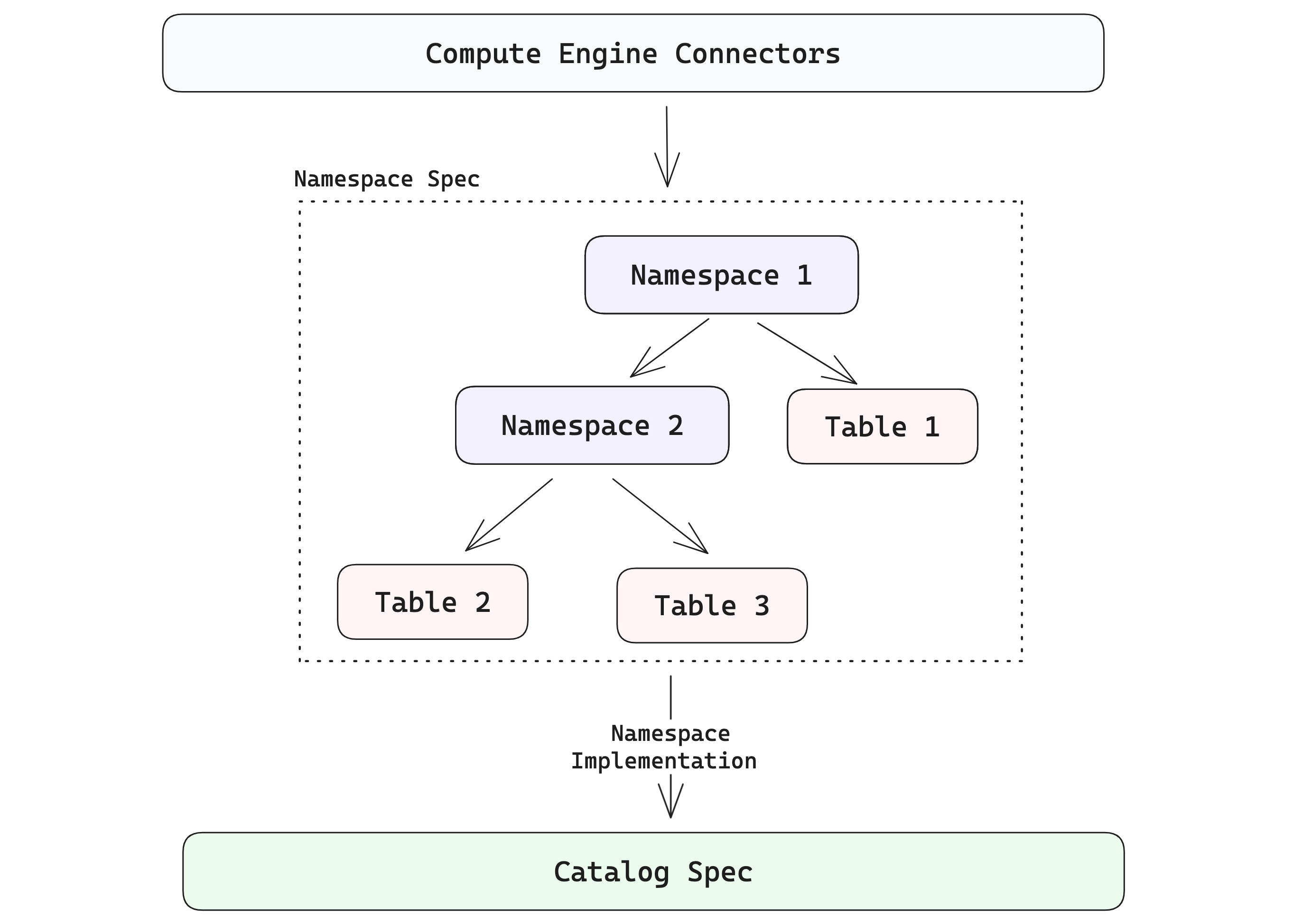 Before diving into examples, it helps to keep two terms in mind: the **namespace client** is the abstraction that presents a consistent namespace API, while the **namespace implementation** is the concrete backend that resolves namespaces and table locations (for example, a local directory or an external catalog).
If you want to go deeper, see the Lance format [namespace documentation](https://lance.org/format/namespace/).
## Namespace paths and names
A namespace path is a list of components. For example, `["prod", "search"]` means the `search`
namespace inside the `prod` namespace. The empty path, `[]`, means the root namespace.
Each component is a name, not a filesystem path segment. Namespace names can't be empty, and each
component can contain only letters, numbers, underscores, hyphens, and periods. That keeps the same
identifier usable across local directory namespaces and REST namespace identifiers.
## Directory namespaces
The simplest namespace model in LanceDB is a single root namespace, often represented by one
directory:
```bash theme={"theme":{"light":"vitesse-light","dark":"catppuccin-mocha"}}
./local_lancedb (root)
└── prod
└── search
└── user (table)
└── data (table)
```
As a user of LanceDB OSS, you might never notice namespaces at first, because LanceDB exposes the single-level hierarchy shown above, with the data stored in the `data/` directory, where the root namespace is implicit. Connecting to this namespace is as simple as connecting to the catalog root:
```python Python icon="python" theme={"theme":{"light":"vitesse-light","dark":"catppuccin-mocha"}}
import lancedb
# Connect to the directory namespace root
db = lancedb.connect("./local_lancedb")
```
```typescript TypeScript icon="square-js" theme={"theme":{"light":"vitesse-light","dark":"catppuccin-mocha"}}
import * as lancedb from "@lancedb/lancedb";
// Connect to the directory namespace root
const db = await lancedb.connect("./local_lancedb");
```
```rust Rust icon="rust" theme={"theme":{"light":"vitesse-light","dark":"catppuccin-mocha"}}
use lancedb::connect;
// Connect to the directory namespace root
let db = connect("./local_lancedb").execute().await?;
```
This creates the default namespace directory (`data/`) under the specified root path.
You can also explicitly connect to a namespace using `lancedb.connect_namespace(...)` with the directory namespace implementation:
```python Python icon="python" theme={"theme":{"light":"vitesse-light","dark":"catppuccin-mocha"}}
import lancedb
# Local namespace-backed catalog root (DirectoryNamespace)
# See https://lance.org/format/namespace/dir/catalog-spec/
db = lancedb.connect_namespace("dir", {"root": "./local_lancedb"})
table_name = "user"
data = [{"id": 1, "vector": [0.1, 0.2], "name": "alice"}]
table = db.create_table(table_name, data=data, mode="create")
print(f"Created table: {table.name}")
# Created table: user
```
```typescript TypeScript icon="square-js" theme={"theme":{"light":"vitesse-light","dark":"catppuccin-mocha"}}
import * as lancedb from "@lancedb/lancedb";
// Local namespace-backed catalog root (DirectoryNamespace)
// See https://lance.org/format/namespace/dir/catalog-spec/
const db = await lancedb.connectNamespace("dir", { root: "./local_lancedb" });
const table = await db.createTable(
"user",
[{ id: 1, vector: [0.1, 0.2], name: "alice" }],
{ mode: "create" },
);
console.log(`Created table: ${table.name}`);
// Created table: user
```
```rust Rust icon="rust" theme={"theme":{"light":"vitesse-light","dark":"catppuccin-mocha"}}
use std::collections::HashMap;
use std::sync::Arc;
use arrow_schema::{DataType, Field, Schema};
// Local namespace-backed catalog root (DirectoryNamespace)
// See https://lance.org/format/namespace/dir/catalog-spec/
let mut properties = HashMap::new();
properties.insert("root".to_string(), "./local_lancedb".to_string());
let db = lancedb::connect_namespace("dir", properties)
.execute()
.await?;
let schema = Arc::new(Schema::new(vec![
Field::new("id", DataType::Int64, false),
]));
let table = db
.create_empty_table("user", schema)
.execute()
.await?;
println!("Created table: {}", table.name());
// Created table: user
```
* For simple use cases in LanceDB OSS, you don't need to go too deep into namespaces.
* To integrate LanceDB with external catalogs and to use it as a true **multimodal lakehouse**, it's useful to understand the different namespace implementations and how to use them in your organization's setup.
## Remote or external catalog namespaces
The example above showed local directory-based namespaces. LanceDB also supports namespaces backed by remote object stores and external catalogs, via the REST namespace implementation.
For remote object stores with central metadata/catalog services (either commercial or open source),
use the REST namespace implementation. It is backed by REST routes
(for example `POST /v1/namespace/{id}/create` and `GET /v1/namespace/{id}/list`) and server-provided table locations.
For authentication, any property prefixed with `headers` is forwarded as an HTTP header
(for example `headers.Authorization` becomes `Authorization`, and `headers.X-API-Key` becomes `X-API-Key`).
LanceDB Enterprise REST requests use the `x-api-key` header for API-key authentication. Deployments
that route multiple databases through the same endpoint can also use headers such as
`x-lancedb-database` or `x-lancedb-database-prefix` for database context.
```python Python icon="python" theme={"theme":{"light":"vitesse-light","dark":"catppuccin-mocha"}}
import os
import lancedb
# Remote namespace-backed catalog root (RestNamespace)
# See https://lance.org/format/namespace/rest/catalog-spec/
db = lancedb.connect_namespace(
"rest",
{
"uri": "https://.internal..com",
"headers.x-api-key": os.environ["API_KEY"],
# or:
# "headers.Authorization": f"Bearer {os.environ['REST_AUTH_TOKEN']}",
},
)
```
```typescript TypeScript icon="square-js" theme={"theme":{"light":"vitesse-light","dark":"catppuccin-mocha"}}
import * as lancedb from "@lancedb/lancedb";
// Remote namespace-backed catalog root (RestNamespace)
// See https://lance.org/format/namespace/rest/catalog-spec/
const db = await lancedb.connectNamespace("rest", {
uri: "https://.internal..com",
headers: {
"x-api-key": process.env.API_KEY ?? "",
// or:
// Authorization: `Bearer ${process.env.REST_AUTH_TOKEN}`,
},
});
```
```rust Rust icon="rust" theme={"theme":{"light":"vitesse-light","dark":"catppuccin-mocha"}}
use std::collections::HashMap;
// Remote namespace-backed catalog root (RestNamespace)
// See https://lance.org/format/namespace/rest/catalog-spec/
let mut properties = HashMap::new();
properties.insert(
"uri".to_string(),
"https://.internal..com".to_string(),
);
properties.insert(
"headers.x-api-key".to_string(),
std::env::var("API_KEY")?,
);
// or:
// properties.insert(
// "headers.Authorization".to_string(),
// format!("Bearer {}", std::env::var("REST_AUTH_TOKEN")?),
// );
let db = lancedb::connect_namespace("rest", properties)
.execute()
.await?;
```
[LanceDB Enterprise](/enterprise) operates a REST namespace server on top of the Lance format, so any REST client that can speak the REST namespace API
contract can be used to interact with it. For authentication examples in LanceDB Enterprise, visit
the [Namespaces in SDKs](/namespaces/usage#namespaces-in-lancedb-enterprise) page.
## Best practices
Below, we list some best practices for working with namespaces:
* For simple use cases and single, stand-alone applications, the directory-based root namespace is sufficient and requires no special configuration.
* For remote storage locations, introduce explicit namespaces when multiple teams, environments, or domains share the same catalog.
* Treat namespace paths as stable identifiers (for example `"prod/search"`, `"staging/recs"`).
* For maintainability reasons, avoid hard-coding object-store table paths in application code -- instead, prefer catalog identifiers + namespaces.
Before diving into examples, it helps to keep two terms in mind: the **namespace client** is the abstraction that presents a consistent namespace API, while the **namespace implementation** is the concrete backend that resolves namespaces and table locations (for example, a local directory or an external catalog).
If you want to go deeper, see the Lance format [namespace documentation](https://lance.org/format/namespace/).
## Namespace paths and names
A namespace path is a list of components. For example, `["prod", "search"]` means the `search`
namespace inside the `prod` namespace. The empty path, `[]`, means the root namespace.
Each component is a name, not a filesystem path segment. Namespace names can't be empty, and each
component can contain only letters, numbers, underscores, hyphens, and periods. That keeps the same
identifier usable across local directory namespaces and REST namespace identifiers.
## Directory namespaces
The simplest namespace model in LanceDB is a single root namespace, often represented by one
directory:
```bash theme={"theme":{"light":"vitesse-light","dark":"catppuccin-mocha"}}
./local_lancedb (root)
└── prod
└── search
└── user (table)
└── data (table)
```
As a user of LanceDB OSS, you might never notice namespaces at first, because LanceDB exposes the single-level hierarchy shown above, with the data stored in the `data/` directory, where the root namespace is implicit. Connecting to this namespace is as simple as connecting to the catalog root:
```python Python icon="python" theme={"theme":{"light":"vitesse-light","dark":"catppuccin-mocha"}}
import lancedb
# Connect to the directory namespace root
db = lancedb.connect("./local_lancedb")
```
```typescript TypeScript icon="square-js" theme={"theme":{"light":"vitesse-light","dark":"catppuccin-mocha"}}
import * as lancedb from "@lancedb/lancedb";
// Connect to the directory namespace root
const db = await lancedb.connect("./local_lancedb");
```
```rust Rust icon="rust" theme={"theme":{"light":"vitesse-light","dark":"catppuccin-mocha"}}
use lancedb::connect;
// Connect to the directory namespace root
let db = connect("./local_lancedb").execute().await?;
```
This creates the default namespace directory (`data/`) under the specified root path.
You can also explicitly connect to a namespace using `lancedb.connect_namespace(...)` with the directory namespace implementation:
```python Python icon="python" theme={"theme":{"light":"vitesse-light","dark":"catppuccin-mocha"}}
import lancedb
# Local namespace-backed catalog root (DirectoryNamespace)
# See https://lance.org/format/namespace/dir/catalog-spec/
db = lancedb.connect_namespace("dir", {"root": "./local_lancedb"})
table_name = "user"
data = [{"id": 1, "vector": [0.1, 0.2], "name": "alice"}]
table = db.create_table(table_name, data=data, mode="create")
print(f"Created table: {table.name}")
# Created table: user
```
```typescript TypeScript icon="square-js" theme={"theme":{"light":"vitesse-light","dark":"catppuccin-mocha"}}
import * as lancedb from "@lancedb/lancedb";
// Local namespace-backed catalog root (DirectoryNamespace)
// See https://lance.org/format/namespace/dir/catalog-spec/
const db = await lancedb.connectNamespace("dir", { root: "./local_lancedb" });
const table = await db.createTable(
"user",
[{ id: 1, vector: [0.1, 0.2], name: "alice" }],
{ mode: "create" },
);
console.log(`Created table: ${table.name}`);
// Created table: user
```
```rust Rust icon="rust" theme={"theme":{"light":"vitesse-light","dark":"catppuccin-mocha"}}
use std::collections::HashMap;
use std::sync::Arc;
use arrow_schema::{DataType, Field, Schema};
// Local namespace-backed catalog root (DirectoryNamespace)
// See https://lance.org/format/namespace/dir/catalog-spec/
let mut properties = HashMap::new();
properties.insert("root".to_string(), "./local_lancedb".to_string());
let db = lancedb::connect_namespace("dir", properties)
.execute()
.await?;
let schema = Arc::new(Schema::new(vec![
Field::new("id", DataType::Int64, false),
]));
let table = db
.create_empty_table("user", schema)
.execute()
.await?;
println!("Created table: {}", table.name());
// Created table: user
```
* For simple use cases in LanceDB OSS, you don't need to go too deep into namespaces.
* To integrate LanceDB with external catalogs and to use it as a true **multimodal lakehouse**, it's useful to understand the different namespace implementations and how to use them in your organization's setup.
## Remote or external catalog namespaces
The example above showed local directory-based namespaces. LanceDB also supports namespaces backed by remote object stores and external catalogs, via the REST namespace implementation.
For remote object stores with central metadata/catalog services (either commercial or open source),
use the REST namespace implementation. It is backed by REST routes
(for example `POST /v1/namespace/{id}/create` and `GET /v1/namespace/{id}/list`) and server-provided table locations.
For authentication, any property prefixed with `headers` is forwarded as an HTTP header
(for example `headers.Authorization` becomes `Authorization`, and `headers.X-API-Key` becomes `X-API-Key`).
LanceDB Enterprise REST requests use the `x-api-key` header for API-key authentication. Deployments
that route multiple databases through the same endpoint can also use headers such as
`x-lancedb-database` or `x-lancedb-database-prefix` for database context.
```python Python icon="python" theme={"theme":{"light":"vitesse-light","dark":"catppuccin-mocha"}}
import os
import lancedb
# Remote namespace-backed catalog root (RestNamespace)
# See https://lance.org/format/namespace/rest/catalog-spec/
db = lancedb.connect_namespace(
"rest",
{
"uri": "https://.internal..com",
"headers.x-api-key": os.environ["API_KEY"],
# or:
# "headers.Authorization": f"Bearer {os.environ['REST_AUTH_TOKEN']}",
},
)
```
```typescript TypeScript icon="square-js" theme={"theme":{"light":"vitesse-light","dark":"catppuccin-mocha"}}
import * as lancedb from "@lancedb/lancedb";
// Remote namespace-backed catalog root (RestNamespace)
// See https://lance.org/format/namespace/rest/catalog-spec/
const db = await lancedb.connectNamespace("rest", {
uri: "https://.internal..com",
headers: {
"x-api-key": process.env.API_KEY ?? "",
// or:
// Authorization: `Bearer ${process.env.REST_AUTH_TOKEN}`,
},
});
```
```rust Rust icon="rust" theme={"theme":{"light":"vitesse-light","dark":"catppuccin-mocha"}}
use std::collections::HashMap;
// Remote namespace-backed catalog root (RestNamespace)
// See https://lance.org/format/namespace/rest/catalog-spec/
let mut properties = HashMap::new();
properties.insert(
"uri".to_string(),
"https://.internal..com".to_string(),
);
properties.insert(
"headers.x-api-key".to_string(),
std::env::var("API_KEY")?,
);
// or:
// properties.insert(
// "headers.Authorization".to_string(),
// format!("Bearer {}", std::env::var("REST_AUTH_TOKEN")?),
// );
let db = lancedb::connect_namespace("rest", properties)
.execute()
.await?;
```
[LanceDB Enterprise](/enterprise) operates a REST namespace server on top of the Lance format, so any REST client that can speak the REST namespace API
contract can be used to interact with it. For authentication examples in LanceDB Enterprise, visit
the [Namespaces in SDKs](/namespaces/usage#namespaces-in-lancedb-enterprise) page.
## Best practices
Below, we list some best practices for working with namespaces:
* For simple use cases and single, stand-alone applications, the directory-based root namespace is sufficient and requires no special configuration.
* For remote storage locations, introduce explicit namespaces when multiple teams, environments, or domains share the same catalog.
* Treat namespace paths as stable identifiers (for example `"prod/search"`, `"staging/recs"`).
* For maintainability reasons, avoid hard-coding object-store table paths in application code -- instead, prefer catalog identifiers + namespaces.