> ## Documentation Index
> Fetch the complete documentation index at: https://docs.lancedb.com/llms.txt
> Use this file to discover all available pages before exploring further.
# Voxel51
export const PyPlatformsVoxel51SortBySimilarity = "# Step 4: Query your data\nquery = dataset.first().id # query by sample ID\nview = dataset.sort_by_similarity(\n query,\n brain_key=\"lancedb_index\",\n k=10, # limit to 10 most similar samples\n)\n";
export const PyPlatformsVoxel51LoadDataset = "import fiftyone as fo\nimport fiftyone.brain as fob\nimport fiftyone.zoo as foz\n\n# Step 1: Load your data into FiftyOne\ndataset = foz.load_zoo_dataset(\"quickstart\")\n";
export const PyPlatformsVoxel51ComputeSimilarity = "# Steps 2 and 3: Compute embeddings and create a similarity index\nlancedb_index = fob.compute_similarity(\n dataset,\n model=\"clip-vit-base32-torch\",\n brain_key=\"lancedb_index\",\n backend=\"lancedb\",\n)\n";
export const PyPlatformsVoxel51Cleanup = "# Step 5 (optional): Cleanup\n\n# Delete the LanceDB table\nlancedb_index.cleanup()\n\n# Delete run record from FiftyOne\ndataset.delete_brain_run(\"lancedb_index\")\n";
export const PyPlatformsVoxel51BrainConfig = "import fiftyone.brain as fob\n\n# Print your current brain config\nprint(fob.brain_config)\n";
export const PyPlatformsVoxel51BackendParams = "lancedb_index = fob.compute_similarity(\n dataset,\n model=\"clip-vit-base32-torch\",\n backend=\"lancedb\",\n brain_key=\"lancedb_index\",\n table_name=\"your-table\",\n metric=\"euclidean\",\n uri=\"/tmp/lancedb\",\n)\n";
export const PyPlatformsVoxel51BackendFlag = "import fiftyone.brain as fob\n\n# Re-run similarity creation using the LanceDB backend explicitly\nfob.compute_similarity(\n dataset,\n model=\"clip-vit-base32-torch\",\n brain_key=\"lancedb_index\",\n backend=\"lancedb\",\n)\n";
# FiftyOne
[FiftyOne](https://docs.voxel51.com/) is an open source toolkit that enables users to curate better data and build better models. It includes tools for data exploration, visualization, and management, as well as features for collaboration and sharing.
Any developers, data scientists, and researchers who work with computer vision and machine learning can use FiftyOne to improve the quality of their datasets and deliver insights about their models.
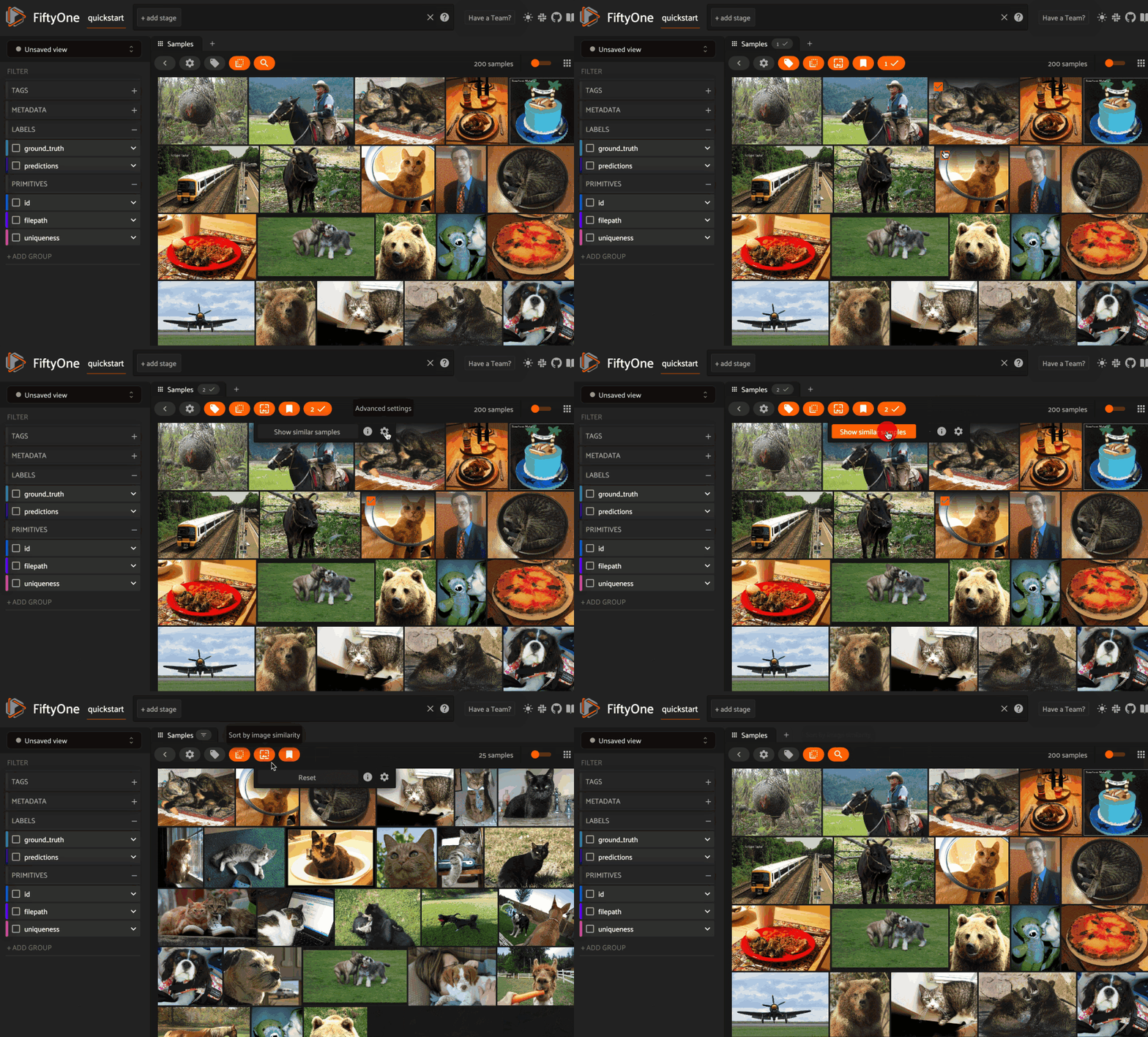 **FiftyOne** provides an API to create LanceDB tables and run similarity queries, both **programmatically in Python** and via **point-and-click in the App**.
Let's get started and see how to use **LanceDB** to create a **similarity index** on your FiftyOne datasets.
## Overview
[Embeddings](/embedding/) are foundational to all of the **vector search** features. In FiftyOne, embeddings are managed by the [**FiftyOne Brain**](https://docs.voxel51.com/user_guide/brain.html) that provides powerful machine learning techniques designed to transform how you curate your data from an art into a measurable science.
> *Have you ever wanted to find the images most similar to an image in your dataset?*
The **FiftyOne Brain** makes computing **visual similarity** really easy. You can compute the similarity of samples in your dataset using an embedding model and store the results in the **brain key**.
You can then sort your samples by similarity or use this information to find potential duplicate images.
We'll be doing the following :
1. **Create Index** - In order to run similarity queries against our media, we need to **index** the data. We can do this via the `compute_similarity()` function.
* In the function, specify the **model** you want to use to generate the embedding vectors, and what **vector search engine** you want to use on the **backend** (here LanceDB).
You can also give the similarity index a name(`brain_key`), which is useful if you want to run vector searches against multiple indexes.
2. **Query** - Once you have generated your similarity index, you can query your dataset with `sort_by_similarity()`. The query can be any of the following:
* An ID (sample or patch)
* A query vector of same dimension as the index
* A list of IDs (samples or patches)
* A text prompt (search semantically)
## Prerequisites: install necessary dependencies
1. **Create and activate a virtual environment**
Install virtualenv package and run the following command in your project directory.
python -m venv fiftyone\_
From inside the project directory run the following to activate the virtual environment.
source fiftyone\_/Scripts/activate
fiftyone\_/Scripts/activate
2. **Install the following packages in the virtual environment**
To install FiftyOne, ensure you have activated any virtual environment that you are using, then run
pip install fiftyone
## Understand basic workflow
The basic workflow shown below uses LanceDB to create a similarity index on your FiftyOne datasets:
1. Load a dataset into FiftyOne.
2. Compute embedding vectors for samples or patches in your dataset, or select a model to use to generate embeddings.
3. Use the `compute_similarity()` method to generate a LanceDB table for the samples or object patches embeddings in a dataset by setting the parameter `backend="lancedb"` and specifying a `brain_key` of your choice.
4. Use this LanceDB table to query your data with `sort_by_similarity()`.
5. If desired, delete the table.
## Quick Example
Let's jump on a quick example that demonstrates this workflow.
{PyPlatformsVoxel51LoadDataset}
Make sure you install torch ([guide here](https://pytorch.org/get-started/locally/)) before proceeding.
{PyPlatformsVoxel51ComputeSimilarity}
!!! note
Running the code above will download the clip model (2.6Gb)
Once the similarity index has been generated, we can query our data in FiftyOne by specifying the `brain_key`:
{PyPlatformsVoxel51SortBySimilarity}
The returned result are of type - `DatasetView`.
`DatasetView` does not hold its contents in-memory. Views simply store the rule(s) that are applied to extract the content of interest from the underlying Dataset when the view is iterated/aggregated on.
This means, for example, that the contents of a `DatasetView` may change as the underlying Dataset is modified.
> *Can you query a view instead of dataset?*
Yes, you can also query a view.
Performing a similarity search on a `DatasetView` will only return results from the view; if the view contains samples that were not included in the index, they will never be included in the result.
This means that you can index an entire Dataset once and then perform searches on subsets of the dataset by constructing views that contain the images of interest.
{PyPlatformsVoxel51Cleanup}
## Using LanceDB backend
By default, calling `compute_similarity()` or `sort_by_similarity()` will use an sklearn backend.
To use the LanceDB backend, simply set the optional `backend` parameter of `compute_similarity()` to `"lancedb"`:
{PyPlatformsVoxel51BackendFlag}
Alternatively, you can configure FiftyOne to use the LanceDB backend by setting the following environment variable.
In your terminal, set the environment variable using:
export FIFTYONE\_BRAIN\_DEFAULT\_SIMILARITY\_BACKEND=lancedb
\$Env:FIFTYONE\_BRAIN\_DEFAULT\_SIMILARITY\_BACKEND="lancedb" //powershell
set FIFTYONE\_BRAIN\_DEFAULT\_SIMILARITY\_BACKEND=lancedb //cmd
This will only run during the terminal session. Once terminal is closed, environment variable is deleted.
Alternatively, you can **permanently** configure FiftyOne to use the LanceDB backend creating a `brain_config.json` at `~/.fiftyone/brain_config.json`. The JSON file may contain any desired subset of config fields that you wish to customize.
```json theme={"theme":{"light":"vitesse-light","dark":"catppuccin-mocha"}}
{
"default_similarity_backend": "lancedb"
}
```
This will override the default `brain_config` and will set it according to your customization. You can check the configuration by running the following code :
{PyPlatformsVoxel51BrainConfig}
## LanceDB config parameters
The LanceDB backend supports query parameters that can be used to customize your similarity queries. These parameters include:
| Name | Purpose | Default |
| :-------------- | :--------------------------------------------------------------------------------------------------------------- | :--------------- |
| **table\_name** | The name of the LanceDB table to use. If none is provided, a new table will be created | `None` |
| **metric** | The embedding distance metric to use when creating a new table. The supported values are ("cosine", "euclidean") | `"cosine"` |
| **uri** | The database URI to use. In this Database URI, tables will be created. | `"/tmp/lancedb"` |
There are two ways to specify/customize the parameters:
1. **Using `brain_config.json` file**
```json theme={"theme":{"light":"vitesse-light","dark":"catppuccin-mocha"}}
{
"similarity_backends": {
"lancedb": {
"table_name": "your-table",
"metric": "euclidean",
"uri": "/tmp/lancedb"
}
}
}
```
2. **Directly passing to `compute_similarity()` to configure a specific new index** :
{PyPlatformsVoxel51BackendParams}
For a much more in depth walkthrough of the integration, visit the LanceDB x Voxel51 [docs page](https://docs.voxel51.com/integrations/lancedb.html).
**FiftyOne** provides an API to create LanceDB tables and run similarity queries, both **programmatically in Python** and via **point-and-click in the App**.
Let's get started and see how to use **LanceDB** to create a **similarity index** on your FiftyOne datasets.
## Overview
[Embeddings](/embedding/) are foundational to all of the **vector search** features. In FiftyOne, embeddings are managed by the [**FiftyOne Brain**](https://docs.voxel51.com/user_guide/brain.html) that provides powerful machine learning techniques designed to transform how you curate your data from an art into a measurable science.
> *Have you ever wanted to find the images most similar to an image in your dataset?*
The **FiftyOne Brain** makes computing **visual similarity** really easy. You can compute the similarity of samples in your dataset using an embedding model and store the results in the **brain key**.
You can then sort your samples by similarity or use this information to find potential duplicate images.
We'll be doing the following :
1. **Create Index** - In order to run similarity queries against our media, we need to **index** the data. We can do this via the `compute_similarity()` function.
* In the function, specify the **model** you want to use to generate the embedding vectors, and what **vector search engine** you want to use on the **backend** (here LanceDB).
You can also give the similarity index a name(`brain_key`), which is useful if you want to run vector searches against multiple indexes.
2. **Query** - Once you have generated your similarity index, you can query your dataset with `sort_by_similarity()`. The query can be any of the following:
* An ID (sample or patch)
* A query vector of same dimension as the index
* A list of IDs (samples or patches)
* A text prompt (search semantically)
## Prerequisites: install necessary dependencies
1. **Create and activate a virtual environment**
Install virtualenv package and run the following command in your project directory.
python -m venv fiftyone\_
From inside the project directory run the following to activate the virtual environment.
source fiftyone\_/Scripts/activate
fiftyone\_/Scripts/activate
2. **Install the following packages in the virtual environment**
To install FiftyOne, ensure you have activated any virtual environment that you are using, then run
pip install fiftyone
## Understand basic workflow
The basic workflow shown below uses LanceDB to create a similarity index on your FiftyOne datasets:
1. Load a dataset into FiftyOne.
2. Compute embedding vectors for samples or patches in your dataset, or select a model to use to generate embeddings.
3. Use the `compute_similarity()` method to generate a LanceDB table for the samples or object patches embeddings in a dataset by setting the parameter `backend="lancedb"` and specifying a `brain_key` of your choice.
4. Use this LanceDB table to query your data with `sort_by_similarity()`.
5. If desired, delete the table.
## Quick Example
Let's jump on a quick example that demonstrates this workflow.
{PyPlatformsVoxel51LoadDataset}
Make sure you install torch ([guide here](https://pytorch.org/get-started/locally/)) before proceeding.
{PyPlatformsVoxel51ComputeSimilarity}
!!! note
Running the code above will download the clip model (2.6Gb)
Once the similarity index has been generated, we can query our data in FiftyOne by specifying the `brain_key`:
{PyPlatformsVoxel51SortBySimilarity}
The returned result are of type - `DatasetView`.
`DatasetView` does not hold its contents in-memory. Views simply store the rule(s) that are applied to extract the content of interest from the underlying Dataset when the view is iterated/aggregated on.
This means, for example, that the contents of a `DatasetView` may change as the underlying Dataset is modified.
> *Can you query a view instead of dataset?*
Yes, you can also query a view.
Performing a similarity search on a `DatasetView` will only return results from the view; if the view contains samples that were not included in the index, they will never be included in the result.
This means that you can index an entire Dataset once and then perform searches on subsets of the dataset by constructing views that contain the images of interest.
{PyPlatformsVoxel51Cleanup}
## Using LanceDB backend
By default, calling `compute_similarity()` or `sort_by_similarity()` will use an sklearn backend.
To use the LanceDB backend, simply set the optional `backend` parameter of `compute_similarity()` to `"lancedb"`:
{PyPlatformsVoxel51BackendFlag}
Alternatively, you can configure FiftyOne to use the LanceDB backend by setting the following environment variable.
In your terminal, set the environment variable using:
export FIFTYONE\_BRAIN\_DEFAULT\_SIMILARITY\_BACKEND=lancedb
\$Env:FIFTYONE\_BRAIN\_DEFAULT\_SIMILARITY\_BACKEND="lancedb" //powershell
set FIFTYONE\_BRAIN\_DEFAULT\_SIMILARITY\_BACKEND=lancedb //cmd
This will only run during the terminal session. Once terminal is closed, environment variable is deleted.
Alternatively, you can **permanently** configure FiftyOne to use the LanceDB backend creating a `brain_config.json` at `~/.fiftyone/brain_config.json`. The JSON file may contain any desired subset of config fields that you wish to customize.
```json theme={"theme":{"light":"vitesse-light","dark":"catppuccin-mocha"}}
{
"default_similarity_backend": "lancedb"
}
```
This will override the default `brain_config` and will set it according to your customization. You can check the configuration by running the following code :
{PyPlatformsVoxel51BrainConfig}
## LanceDB config parameters
The LanceDB backend supports query parameters that can be used to customize your similarity queries. These parameters include:
| Name | Purpose | Default |
| :-------------- | :--------------------------------------------------------------------------------------------------------------- | :--------------- |
| **table\_name** | The name of the LanceDB table to use. If none is provided, a new table will be created | `None` |
| **metric** | The embedding distance metric to use when creating a new table. The supported values are ("cosine", "euclidean") | `"cosine"` |
| **uri** | The database URI to use. In this Database URI, tables will be created. | `"/tmp/lancedb"` |
There are two ways to specify/customize the parameters:
1. **Using `brain_config.json` file**
```json theme={"theme":{"light":"vitesse-light","dark":"catppuccin-mocha"}}
{
"similarity_backends": {
"lancedb": {
"table_name": "your-table",
"metric": "euclidean",
"uri": "/tmp/lancedb"
}
}
}
```
2. **Directly passing to `compute_similarity()` to configure a specific new index** :
{PyPlatformsVoxel51BackendParams}
For a much more in depth walkthrough of the integration, visit the LanceDB x Voxel51 [docs page](https://docs.voxel51.com/integrations/lancedb.html).